


















































Types Of Power Automate Flows – A CTO’s Guide
Power Automation is no longer an option but a necessity for every firm, be it legal, fintech, aviation, or healthcare. In times of hectic schedules, just imagine there you have an...


601 & 612, The Times square Arcade, Near Baghban party plot, Thaltej - Shilaj Road, Thaltej, Ahmedabad, Gujarat - 380059
Listening is fun too.
Straighten your back and cherish with coffee - PLAY !
Summarize this article with:


Businesses, today, are increasingly relying on automation tools to deal with repetitive tasks and productivity. Power Automate and UiPath, the two prominent RPA platforms have emerged as the go-to choice for workflow and business process automation. These are known for their unique features and have superior automation capabilities.
You would wonder to know that Power Automate and UiPath collectively dominate about 70% of the global automation market. Their influence is expected to be crucial in shaping the future market.
UiPath is especially popular, featuring an impressive user base and high ratings, with 2260 reviews averaging at 4.5. On the other hand, Power Automate also has a strong presence with 140 reviews and an average rating of 4.4.
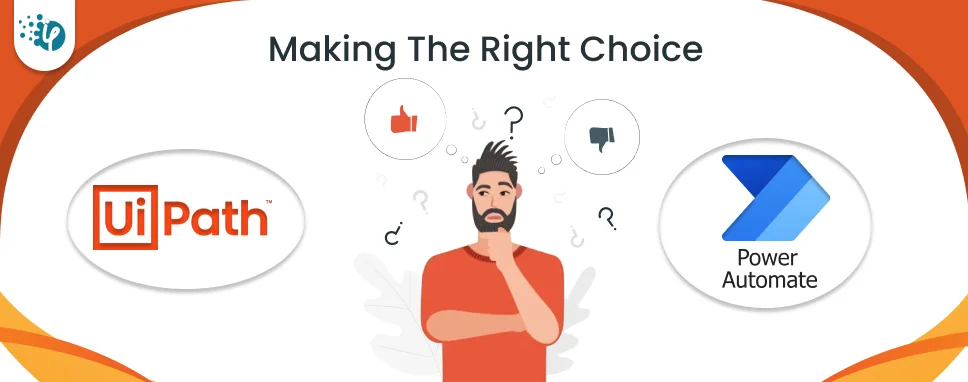
Consultants often find themselves unsure about which platform is right for their automation needs, Power Automate or UiPath? They often get confused by the array of features, pricing structures, and compatibility differences between UiPath and Power Automate.
This uncertainty can hinder their ability of implementing automation solutions, be it for their clients, or company. This leads to delays and misses opportunities for efficiency gains.
In our blog, we will dissect these complexities and provide clear guidance to help consultants confidently choose the platform that aligns best with their goals and requirements.
Microsoft Power Automate, formerly known as Power Flow is a SaaS and cloud-based platform used to optimize and automate workflows. Using this tool, consultants can create automated workflows between apps and services.
Microsoft Power Automate is part of a large Microsoft ecosystem. By having a good understanding of Business Process Automation (BPA), Power Automate consultants can help businesses develop reusable workflows that spring into action and carry out tasks when activated.
Power Flow or Power Automate is a Robotic Process Automation tool that allows users to design end-to-end RPA processes for their specific workflow needs. Here users can conduct email processing, form processing, approvals, etc.
Leverage Microsoft Power Automate consulting services and avail maximum benefits for your business.
UiPath became an RPA company in 2005 and began with a mission to create software that uses AI and automation. It is known for its strong RPA capabilities and offers open code to help you better satisfy workflow needs. UiPath allows you to automate tasks that require over and over again. You can make your work go smoother and get more done in less time.
UiPath offers a drag-and-drop interface that makes it easy to create, deploy, and manage RPA bots. The core RPA product of UiPath is cloud-native offerings along with the custom-designed studio for professional and native programmers. All these essentials make UiPath the most preferred RPA tool in the Industry.
Let’s figure out some difference between Power Automate and UiPath to understand these technologies better.
| Comparison Factors | Power Automate | UiPath |
|---|---|---|
| Integration | Seamless integration with Microsoft ecosystem | Versatile integration options with other products and services |
| Drag and drop editor | No | Yes |
| Scalability | Suitable for smaller to mid-ranged workflow | Designed for smaller, mid-sized, and enterprise-level scalability |
| Ease of usage | Comprises an easy-to-navigate user interface | Required technical expertise especially when it comes to dealing with complex processes |
| Low-code approach | yes | Low code with StudioX |
| Application | Cloud-based | Mainly focused on cloud premises, however, it has recently offered on-premises |
| Targeted audience | Primarily those who are already engaged in the Microsoft ecosystem | Individual professionals and businesses across various corners of the industry |
| Automation type | Flow-based | Rule-based, AI, and ML-based |
| Cost-effective | yes | no |
| Pre-built components | Limited options available | Facilitates an extensive library of pre-built components |
| Pricing model | Subscription-based | Subscription-based |
| Performance | Overall good performance | Robust performance especially for desktop automation |
| Privacy | Compliance with Microsoft’s privacy standards | Follows industry-specific standards and rules |
| Data masking | limited | Advanced data masking |
Of course, UiPath is a #1 automation tool with a strong userbase, but Startups still prefer to go with Power Automate. The reasons are:
Hence, Power Automate is a more affordable option for startups with limited resources and budget constraints. Power Automate is highly adopted by technical people and has a substantial user base of about 10 million monthly active users.
When it comes to Power Automate vs UiPath, we can see both have their own significance and popularity. Given below are some of the significant facts of Power Automate and UiPath.
Let’s check the popularity of RPA solutions from a global perspective.
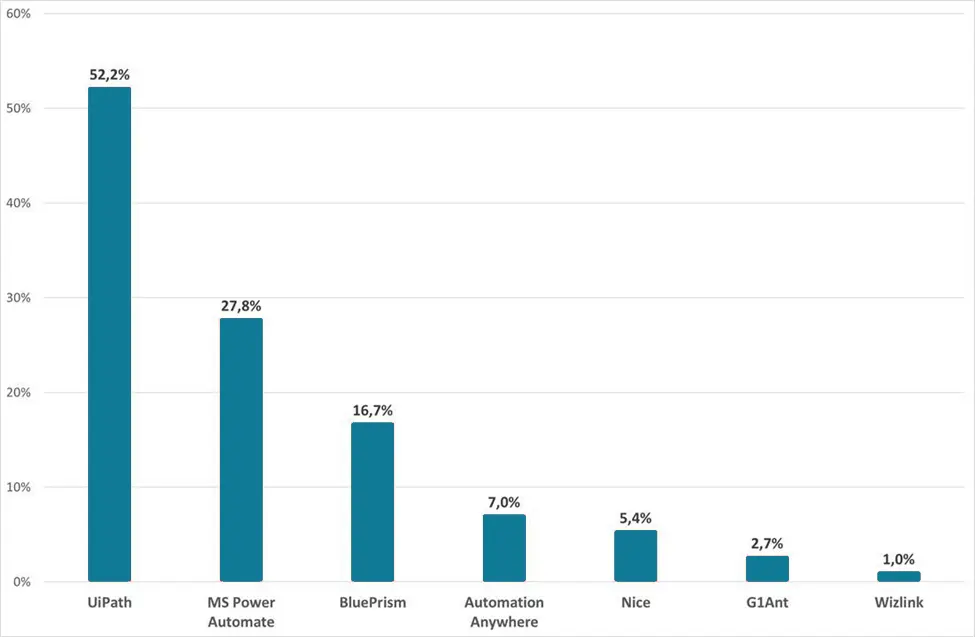
From the above graph, we can observe that:
However, for those who are familiar with Microsoft products, Power Automate could be an impactful tool for their workflow or business process automation.
Consultants can consider the following scenarios when choosing between Power Automate vs UiPath RPA tools.
Your choice between Power Automate and UiPath should be based on the complexity of your automation needs and the technical skills of your team.
UiPath offers flexibility for regular task automation to meet your needs at any scale.
However, its scalability and robustness may be more limited compared to UiPath's comprehensive suite of RPA tools, particularly for highly complex automation requirements.
Power Automate's strength lies in its simplicity and ease of use, making it an excellent choice for automating routine tasks and workflows within the Microsoft ecosystem.
However, for enterprises that require advanced automation capabilities and flexibility, especially in IT environments with diverse systems, UiPath could be an ideal choice.
Let’s look at some advantages and disadvantages of Power Automate and Uipath RPA tools.
Power Automate allows businesses to securely automate their operations at scale with AI and low-code techniques.
Pros:
Cons:
By utilizing the great capabilities of Uipath, programmers can create and consume automation in a secure, collaborative, and administrative environment.
Pros:
Cons:
A straightforward answer to this question is yes, Power Automate and UiPath can be combined together to create more complex solutions. For example, the combination of Power Automate and UiPath enables inbound automation from Microsoft products to UiPath by leveraging Orchestrator APIs.
Next, it can be used as a shared storage medium where users can export the data from Power Automate and store it as a CSV file in shared storage be it OneDrive, SharePoint, or a local drive accessible to UiPath.
Professionals who support UiPath may have no idea that Power Automate could be a better solution for their workflow automation (Business process automation). Here are the reasons:
With the Power Automate vs UiPath comparison, you got enough clarity about the features of each. Right? Now let’s delve further and check which RPA platform is the right fit for your business.
Now, which is better Power Automate or Uipath? This single question can confuse even the most experienced professionals. It's a question that can leave even business professionals scratching their heads, at least once when deciding. UiPath and Power Automate are both great options for businesses, but they have their own unique strengths. It's important for companies to carefully consider their specific needs and requirements before choosing the best solution for them.
Compare options and features before making the right choice: Power Automate or UiPath . Go through your precise requirements and find out which will be a suitable option to work with. Moreover, it's important to consider specific use cases and budget requirements to choose the best RPA tool.
I hope this blog seems informative and helps you discover a lot about Power Automate vs UiPath.
Power Automate differs from the RPA platform in multiple manners such as you can find different automation scopes in both solutions. Moreover, the availability of customization and user interface interaction also differs.
Power Automate and RPA share the common goal of workflow automation processes to enhance workflow efficiency and productivity. However, we can find some differences in both the tech stacks in the manner of scope, capabilities, and target use cases. RPA is typically more suitable for automating complex processes across diverse applications, while Power Automate is often used for simpler automation tasks within the Microsoft ecosystem and other cloud services.
To put it simply both the term refers to the same services because Power Automate was previously known as Power Flow, which was rebranded in 2019 under the part of the Microsoft Suite of products.
The answer to this question is a bit tricky as both the tools have their own plus and negative points. Hence, we can say the choice between UiPath vs Power Automate relies on multiple components like the complexity of automation tasks, integration requirements, scalability stages, and infrastructure of the business.
Uipath is known for its great scalability, integration capability, and community support. On the flip side, Automation Anywhere comprises a comprehensive suite of automation tools that aim to provide enterprise-grade scalability and security.
Power Automate beings helpful for organizations in multiple cases, such as when they wish to optimize their business operations, boost productivity, efficient collaboration, and desire to integrate with other apps or services.
Uipath is known for its great scalability, integration capability, and community support. On the flip side, Automation Anywhere comprises a comprehensive suite of automation tools that aim to provide enterprise-grade scalability and security.
Yes, Power Automate a product of Microsoft can be used for robotic process automation. Power Automate’s RPA capabilities allow for automating manual processes and legacy apps by imitating users’ specific actions, typing, and clicks. Power Automate makes a great choice for businesses that want to automate their workflow within the extensive ecosystem of Microsoft. It’s even ideal to opt for Microsoft Power Automate consulting services to leverage the maximum benefits of this RPA platform.
Both platforms have significant scaling capabilities. Uipath can extend on the scale of small to enterprise-level scalability, on the other hand, Power Automate scales to meet smaller to mid-range automation needs.
Power Automate offers a cloud-based deployment option, while on the flip side, Uipath users can find both cloud-based and on-premises deployment choices.
Both platforms have robust security standards. However, Uipath is much preferred when it comes to managing enterprise-wide automation. In the case of Power Automate, one may face potential security risks while dealing with extensive automation actions.
Power Automate possesses robust capability when it comes to integrating with your existing IT network and apps. In the same way, the robust features of UiPath allow for seamless integration with your existing database and services.

A passionate Technical writer and an SEO freak working as a Content Development Manager at iFour Technolab, USA. With extensive experience in IT, Services, and Product sectors, I relish writing about Azure Cloud, Data Analytics, AI, & Workflow Automation and love sharing exceptional insights on various platforms. I believe in constant learning and am passionate about being better every day.


Build Your Agile Team
Recent Posts

AI in Legal Practice: Powerful Use Cases Every Lawyer Should Know
September 10, 2026

How to Use Power BI for Sales Forecasting (Guide for CTOs)
August 06, 2026

AI in Power BI - Top Use cases and Best Practices
August 03, 2026


How to Build AI Agents: Strategic Guide for CTOs
March 31, 2026
Categories

Power Automation is no longer an option but a necessity for every firm, be it legal, fintech, aviation, or healthcare. In times of hectic schedules, just imagine there you have an...

"Does Power Automate work with Power BI?”. If you think the same, you’re at the right place. Manual reporting plays an important role in business decision-making but requires more...
You will be surprised to know that 90% of the data in the world has been created in just the last two years. That's roughly 74x times the increase compared to 2010 (when the world...

Get this Demo!
Get this Demo!
Get this Demo!
Get this Demo!
Get this Demo!
Get this Demo!