

×

iFour Logo

Best AI Features to Use in Power BI For Smarter Business Intelligence

Kapil Panchal August 03, 2026

Listening is fun too.

Straighten your back and cherish with coffee - PLAY !

  • play
  • pause
  • pause

Summarize this article with:

Best AI Features to Use in Power BI For Smarter Business Intelligence

"Around 3,75,000 organizations rely on Power BI globally. Yet the majority fail to unlock its AI power," says Microsoft's leadership team.

While adoption is stronger, the real business value lies in the deeper use of advanced features like anomaly detection, predictive forecasting, Key Influencers, Smart Narrative, and Copilot.

In this guide, we will explore the most impactful AI features available in Power BI, see how they work, understand the practical business applications, and determine which AI capabilities can deliver the greatest value for your business.

What Are AI Features in Power BI?

AI features in Power BI are built-in capabilities that use artificial intelligence and machine learning to automate data analysis, identify trends, detect anomalies, generate narratives, forecast outcomes, and answer business questions using natural language.

These features help you make faster, data-driven decisions without requiring to be a data analyst.

Key Takeaways of AI Insights in Power BI

  • Power BI includes multiple built-in AI-powered analytics features.
  • Copilot simplifies report creation using natural language.
  • AI visuals uncover patterns that traditional charts may miss.
  • Machine learning integration enables predictive analytics.
  • AI reduces manual analysis while improving decision-making.
  • Businesses can leverage AI features in Power BI without building custom ML models.

Traditional Power BI vs AI-powered Power BI – What's the difference?

Traditional Power BI is driven by four core foundational data building blocks

  • Power Query
  • Power Pivot
  • Power View, and
  • Power Map

While AI-integrated Power BI uses core machine learning and natural language capabilities like Copilot, AI Visuals (for example, Key Influencers), AutoML, and Cognitive Services integration.

Need assistance in making the most out of AI features of Power BI? Hire our BI developers right away.

Why AI Matters in Modern Business Intelligence

Traditional dashboards answer questions like:

  • What happened?
  • How many sales were made?
  • Which region performed best?

AI-powered analytics answers much deeper questions:

  • Why did sales decline?
  • Which customers are likely to churn?
  • What factors influence profitability?
  • Which products will sell next month?
  • What unusual patterns require immediate attention?

Instead of manually analyzing hundreds of reports, Power BI's AI features automatically discover relationships, explain trends, and provide actionable recommendations.

Expert quote on "How AI + Power BI helps":

"Enterprises often invest in BI platforms but continue relying on manual reporting. If they use Power BI's AI capabilities effectively, they can easily shift from descriptive reporting to predictive and prescriptive decision-making."

Vinod Satapara, CTO & Microsoft Power Platform Consultant

How to Use AI In Power BI?

You can use AI in Power BI by enabling Copilot and other AI-infused features. This way, you can move from static reporting into predictive, prescriptive, and conversational insights.

Here are the top ways to use AI in Power BI:

1. Microsoft Copilot in Power BI

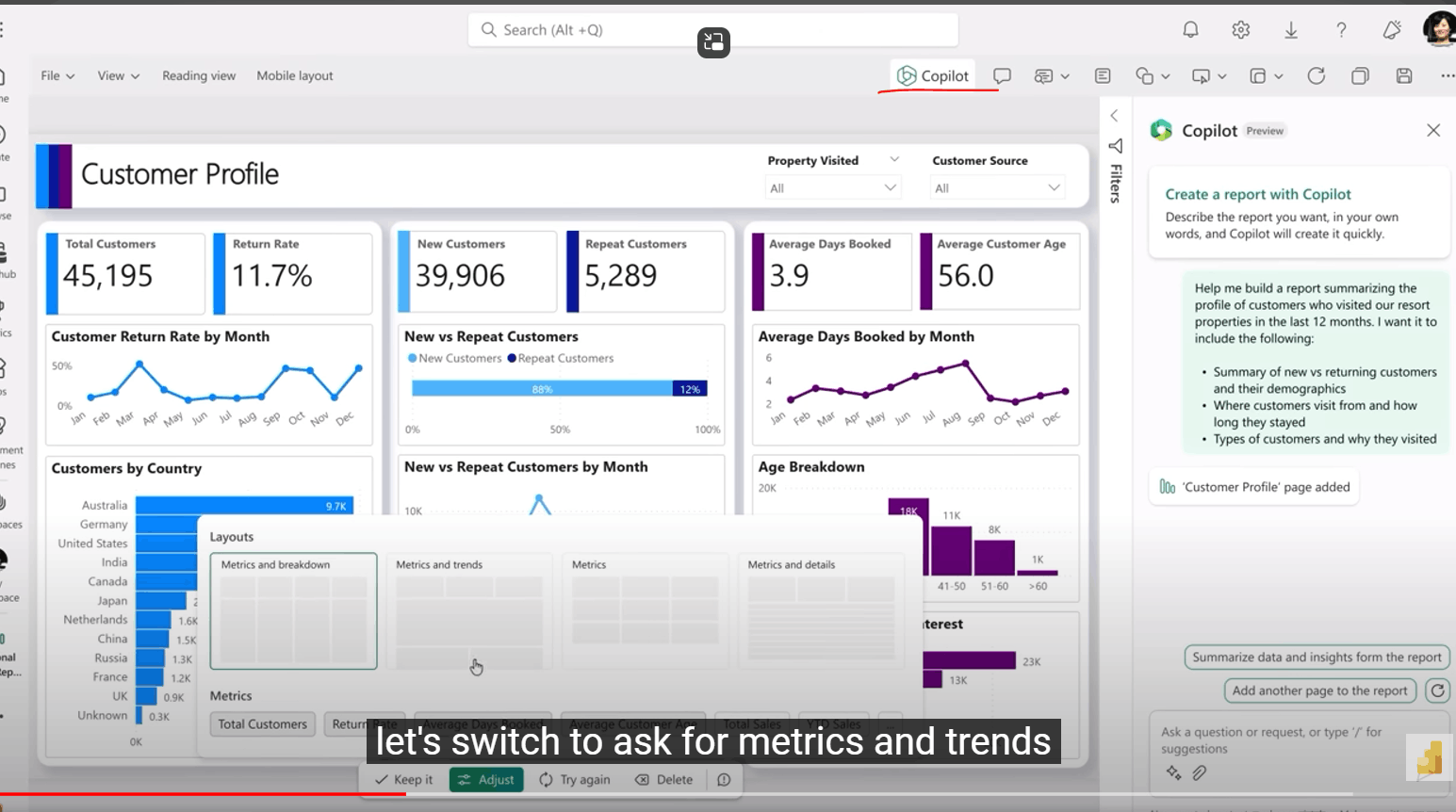
Microsoft Copilot is one of the most significant AI enhancements introduced to Power BI. It uses generative AI to help users create reports, summarize insights, write DAX queries, and interact with data using natural language.

Instead of manually building visualizations, users can simply type prompts such as:

  • Show quarterly sales by region.
  • Identify declining products.
  • Compare revenue with last year.
  • Explain why customer retention decreased.

Copilot generates appropriate charts, summaries, and visualizations automatically.

Microsoft Copilot in Power BI

Source

Why Copilot AI in Power BI Matters

Most business users face challenges in creating reports due to limited Power BI expertise. This is where Copilot helps by lowering the learning curve, enabling non-technical users to generate meaningful reports quickly.

See this Power BI Copilot Tutorial that solves #1 problem.

Example for Microsoft Copilot in Power BI

A retail manager wants to understand declining sales across multiple stores. Instead of manually creating filters and charts, they ask Copilot:

"Why did sales decrease in the South region during Q2?"

Copilot analyzes available data and generates insights highlighting reduced foot traffic, seasonal demand shifts, and lower-performing product categories.

If you want to know why your BI forecasts don't match real-world outcomes, explore this: Power BI forecasting accuracy issues solved

Benefits of using Copilot in Power BI

  • Faster dashboard creation
  • Reduced dependence on analysts
  • Natural language interactions
  • Improved productivity
  • Better accessibility for business users

Limitations of using AI in Power BI

  • Requires high-quality, well-modeled data.
  • Results depend on accurate semantic models.
  • Some advanced scenarios still require manual DAX development.

2. Smart Narrative Visual

What is Smart Narrative?

Smart Narrative automatically converts charts and reports into easy-to-understand written summaries.

Rather than interpreting multiple visuals individually, users receive AI-generated explanations describing significant trends and performance metrics.

Smart Narrative Visual Example

Instead of reviewing multiple sales charts, Smart Narrative may generate:

"Total revenue increased by 18% compared to the previous quarter, primarily driven by higher online sales in the Western region."

This significantly improves executive reporting.
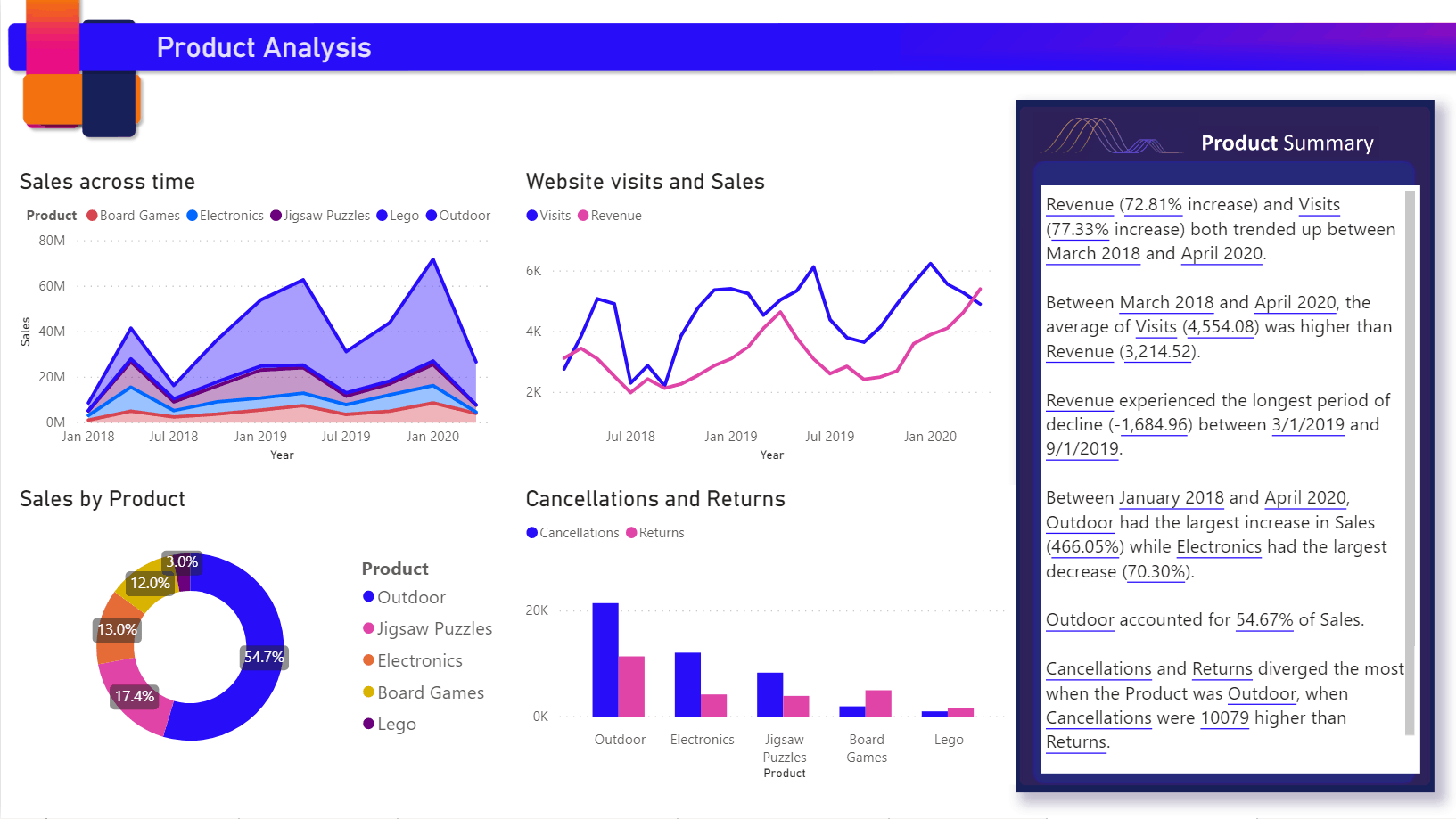
Smart Narrative Visual Example

Source

Why Businesses Use Smart Narrative?

CTOs often prefer concise summaries rather than complex dashboards. Smart Narrative bridges the gap between analytics and business communication.

Top Use Cases of Smart Narrative Visual in Power BI

Check this out to learn how to create dashboard using AI in Power BI.

3. Key Influencers Visual in Power BI

Key Influencers identifies which factors have the greatest impact on a specific business outcome.

Instead of manually testing variables, Power BI automatically analyzes relationships within the dataset.
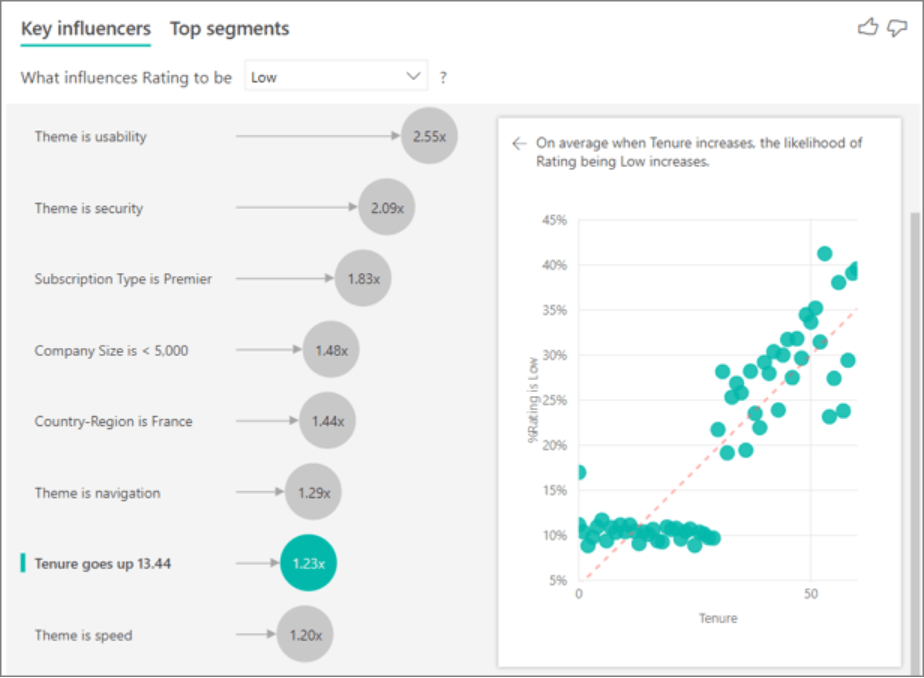
Key Influencers Visual in Power BI

How AI + Power BI helps? (Example scenario)

A healthcare firm wants to understand why patient satisfaction scores have declined.

Power BI identifies key influencing factors such as:

  • Appointment wait time
  • Physician availability
  • Treatment duration
  • Age demographics

This enables leadership to prioritize operational improvements based on data rather than assumptions.

Benefits of Key Influencers Visual in Power BI

  • Identifies hidden business drivers
  • Simplifies root cause analysis
  • Supports data-driven decision-making
  • Improves strategic planning

Limitations of Key Influencers Visual

  • Requires sufficient data volume.
  • Results depend on clean and relevant datasets.

4. AI-Powered Forecasting

What is Forecasting?

Power BI's forecasting capability predicts future values based on historical trends, helping companies foresee demand, inventory needs, business performance, and revenue.

Power BI Forecasting is particularly valuable for industries with seasonal trends or recurring business cycles.

Predictive Analytics with AI Example

An eCommerce company analyzes three years of sales data to forecast holiday demand.

The AI-powered forecast estimates a 22% increase in product demand during the festive season, allowing inventory teams to prepare in advance.

Common Applications of AI Forecasting services

  • Sales forecasting
  • Revenue planning
  • Inventory optimization
  • Financial projections
  • Workforce planning

Business Value

Organizations can proactively allocate resources instead of reacting to unexpected demand fluctuations.

5. Anomaly Detection

What is Anomaly Detection in Power BI?

Anomaly Detection automatically identifies unusual patterns or unexpected changes in business data.

Rather than manually monitoring hundreds of KPIs, Power BI flags abnormal behavior for further investigation.

Best example of Power BI's Anomaly detection

A manufacturing company observes an unexpected spike in production defects.

Power BI highlights the anomaly and correlates it with equipment maintenance delays.

The operations team investigates immediately, reducing downtime and preventing further quality issues.

Why It Matters?

Without AI, anomalies often remain unnoticed until they significantly impact business performance. Automated detection enables firms to respond proactively.

Best Use Cases of Power BI Anomaly Detection

  • Fraud detection
  • Revenue monitoring
  • Website traffic analysis
  • Manufacturing quality control
  • Supply chain management
  • Financial auditing

What benefits do you get with Anomaly Detection in Power BI?

  • Early issue detection
  • Faster incident response
  • Improved operational efficiency
  • Reduced business risk

6. AI Visuals: Turn Complex Data into Actionable Insights

Power BI offers several AI-powered visuals that automatically identify relationships, trends, and outliers without requiring advanced statistical knowledge. These visuals help users move beyond static charts and uncover insights that may otherwise remain hidden.

Why AI Visuals Matter

Traditional charts display what happened. AI visuals explain why it happened by analyzing relationships across multiple dimensions.

Popular AI Visuals in Power BI

AI Visual Purpose Best Used For
Key Influencers Identifies factors driving outcomes Customer churn, sales, profitability
Decomposition Tree Performs guided root-cause analysis Revenue decline, operational issues
Anomaly Detection Finds unexpected patterns Fraud detection, KPI monitoring
Smart Narrative Generates automated summaries Executive reporting

How AI + Power BI helps? (Example scenario)

A telecom company notices a decline in customer renewals. Instead of manually filtering hundreds of variables, analysts use the Decomposition Tree to drill into region, customer age, subscription type, and support history. Within minutes, they identify that premium customers in one region experienced longer support response times—revealing the primary driver behind the churn.

Ajay Patel, CTO & Director at iFour says:

"AI visuals are most effective when combined with a well-designed semantic model. Ensure your data is clean, consistently categorized, and regularly refreshed to improve the quality of AI-generated insights."

7. Ask Questions with Natural Language (Q&A Visual)

What Is the Q&A Visual?

The Q&A Visual allows users to interact with reports using everyday language instead of building charts manually.

Users can type questions such as:

  • What were total sales last quarter?
  • Show revenue by product category.
  • Which city generated the highest profit?
  • Compare this year's sales with last year.

Power BI automatically interprets the request and generates the appropriate visualization.

Why It Matters

Business users often depend on BI teams for even simple reporting requests. Natural Language Q&A empowers managers, executives, and non-technical stakeholders to retrieve insights independently.

Benefits of Q&A Visual in Power BI

  • Reduces dependency on report developers
  • Improves self-service analytics
  • Accelerates decision-making
  • Makes analytics accessible to non-technical users

Best Use Cases of Q&A Visual in Power BI

  • Executive dashboards
  • Sales reporting
  • Finance analytics
  • HR performance monitoring
  • Marketing campaign analysis

Limitations of Q&A Visuals

The feature performs best when the semantic model uses clear business-friendly names instead of technical database fields.

8. AI Insights with Azure Cognitive Services

Power BI integrates with Azure AI services to analyze both structured and unstructured data without requiring custom machine learning models.

You can leverage pre-built AI capabilities such as:

  • Sentiment Analysis
  • Language Detection
  • Key Phrase Extraction
  • Image Recognition
  • Text Analytics

Business Example of AI Azure Cognitive Services

An online retailer collects thousands of customer reviews every month.

Instead of manually reading each review, Power BI automatically classifies customer sentiment into positive, neutral, and negative categories.

Management quickly identifies recurring complaints related to delivery delays and product packaging, enabling faster corrective action.

Business Value

Organizations can extract meaningful insights from customer feedback, surveys, support tickets, emails, and social media conversations.

Benefits of AI Insights using Azure Cognitive Services

  • Eliminates manual text analysis
  • Enhances customer experience
  • Supports Voice-of-Customer programs
  • Improves product development decisions

9. Azure Machine Learning Integration

What Is Azure Machine Learning Integration?

While Power BI includes several built-in AI capabilities, organizations with advanced analytical needs can connect Power BI to Azure Machine Learning models.

This enables businesses to display predictive insights directly within dashboards.

Common Applications of Azure ML Integration:

  • Customer churn prediction
  • Demand forecasting
  • Loan approval scoring
  • Equipment failure prediction
  • Predictive maintenance
  • Fraud detection

Example of Azure ML Integration

A financial institution develops an Azure Machine Learning model to predict loan defaults.

The prediction scores are displayed inside Power BI dashboards, allowing loan officers to assess applicant risk before approving applications.

Benefits of Azure ML Integration

  • Highly customizable
  • Supports advanced predictive analytics
  • Enables enterprise-scale AI adoption
  • Integrates with existing Microsoft ecosystem

Limitations of Azure Machine Learning Integration

Requires data science expertise for model development and ongoing maintenance.

10. AI Insights in Power Query

What Is AI in Power Query?

Power Query isn't just for cleaning and transforming data anymore. It also offers AI-powered transformations that automate complex data preparation tasks.

Users can apply AI functions directly during data preparation without writing machine learning algorithms.

AI Capabilities Available in Power Query Are:

  • Language detection
  • Text summarization
  • Sentiment scoring
  • Key phrase extraction
  • Image tagging
  • Entity recognition

Why AI in Power Query Matters?

Preparing data often consumes a significant portion of analytics projects. AI-assisted transformations reduce manual effort and improve consistency.

Example of using AI Insights in Power Query

An insurance company imports thousands of customer claim descriptions.

Power Query automatically extracts keywords such as:

  • Vehicle damage
  • Water leakage
  • Theft
  • Medical emergency

This structured information enables faster reporting and claim categorization.

Choosing the Right AI Feature for Your Business

Not every organization requires every AI capability. Selecting the right feature depends on your business objectives, data maturity, and analytical requirements.

Business Goal Recommended AI Feature
Executive reporting Smart Narrative
Root cause analysis Key Influencers, Decomposition Tree
Forecast future sales Forecasting
Detect unusual activity Anomaly Detection
Customer feedback analysis Azure Cognitive Services
Predict customer behavior Azure Machine Learning
Self-service reporting Q&A Visual, Copilot
Automate report creation Microsoft Copilot

Best Practices for Using AI Features in Power BI

Implementing AI successfully requires more than enabling a feature. Consider these best practices:

1. Start with High-Quality Data

AI models rely on accurate, complete, and well-structured datasets. Remove duplicates, handle missing values, and establish consistent naming conventions before analysis.

2. Build a Strong Semantic Model

Organize tables, define relationships, and use business-friendly field names. A well-designed semantic model improves the accuracy of Copilot and Natural Language Q&A responses.

3. Match AI Features to Business Problems

Avoid adopting AI simply because it's available. Clearly define the business question you want to answer and select the AI capability that best addresses that need.

4. Validate AI-Generated Insights

AI should support—not replace—human judgment. Always verify recommendations against domain expertise and business context before acting on them.

5. Protect Sensitive Data

When using AI services, ensure compliance with organizational security policies and regulatory requirements. Apply appropriate governance, role-based access controls, and data classification standards.

Organizations that invest in data governance and user training typically realize greater value from Power BI's AI capabilities than those focusing solely on technology implementation. Let's connect and make the most out of Power BI AI features.

Common Mistakes to Avoid While Using AI In Power BI

Many organizations struggle to realize the full value of AI in Power BI due to avoidable missteps. Watch out for these common pitfalls:

  • Relying on poor-quality or incomplete data.
  • Expecting AI to replace business expertise.
  • Ignoring data governance and security practices.
  • Using AI features without clear business objectives.
  • Overloading dashboards with unnecessary AI visuals.
  • Neglecting user training and change management.

Avoiding these mistakes helps ensure that AI delivers actionable insights rather than confusion.

So, that's how augmented analytics emerges as a key driver for modern business intelligence, enabling users to generate insights through natural language queries and automated data exploration.

Hope you found this helpful. For more such insights, explore our Power BI blogs.

Using AI in Power Bi - Final Thoughts

Artificial intelligence has fundamentally changed the way of interaction with business data. Instead of spending hours building reports or manually searching for trends, Power BI now enables users to:

  • Ask questions in natural language,
  • Detect anomalies automatically,
  • Forecast future performance,
  • Identify business drivers, and
  • Generate meaningful insights within minutes.

However, implementing AI successfully isn't about enabling every available feature. It's about selecting the capabilities that align with your enterprise goals.

Whether you're looking to improve executive reporting with Smart Narrative, uncover root causes using Key Influencers, forecast demand with predictive analytics, or empower business users through Copilot, the true value of AI lies in transforming raw data into confident, actionable decisions.

As Microsoft continues to enhance Power BI with Copilot, Microsoft Fabric, and deeper AI integrations, organizations that invest in these capabilities today will be better positioned to make faster, smarter, and more informed business decisions tomorrow.

Need Expert Help with Power BI AI Implementation?

At iFour Technolab, we help organizations make the most out of Microsoft Power BI through:

  • Power BI Dashboard Development
  • AI-Powered Business Intelligence Solutions
  • Microsoft Fabric Consulting
  • Power BI Data Modeling & Optimization
  • Azure AI & Machine Learning Integration
  • Custom BI Strategy and Implementation
  • Power BI Performance Tuning
  • Power Platform Consulting

Whether you're starting your analytics journey or modernizing an existing BI ecosystem, our Microsoft experts can help you build intelligent dashboards that drive measurable business outcomes.

Ready to transform your business with AI-powered analytics? Contact iFour Technolab today to discuss your Power BI implementation and see how intelligent insights can improvise your growth.

AI In Power BI FAQs

1. Which AI feature in Power BI is the most useful for beginners?

For beginners, Microsoft Copilot, Q&A Visual, and Smart Narrative provide the quickest value. They allow users to create reports, ask questions in natural language, and generate report summaries without learning advanced DAX or data modeling techniques.

2. Does Power BI require coding to use AI features?

No. Most built-in AI capabilities—including Key Influencers, Smart Narrative, Anomaly Detection, Forecasting, and Q&A Visual—can be used without writing code. However, integrating custom machine learning models through Azure Machine Learning may require data science expertise.

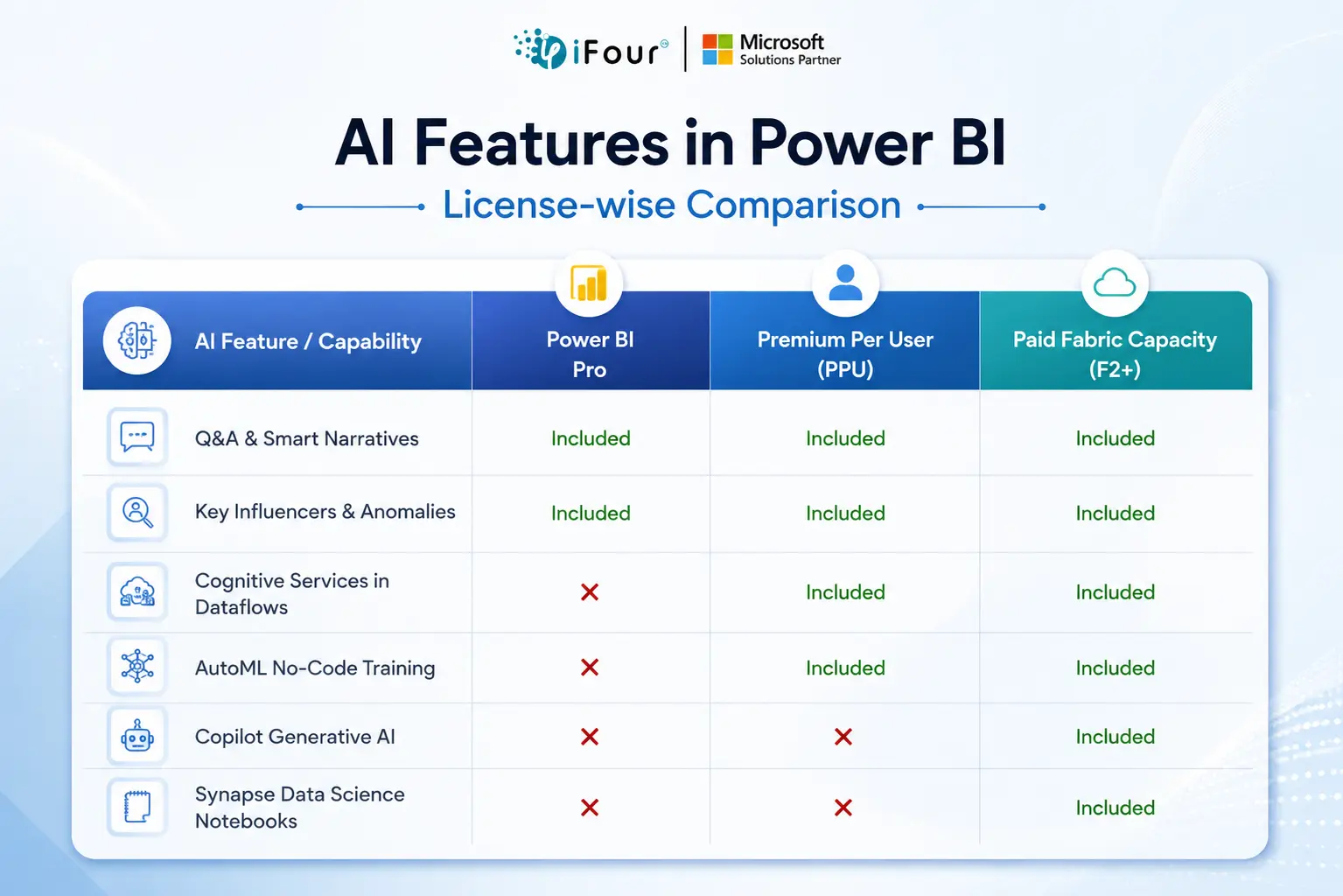
3. Is Microsoft Copilot available in all Power BI plans?

No. Copilot availability depends on your Microsoft licensing and whether your organization has adopted Microsoft Fabric and the required Power BI Premium or Fabric capacities. It's best to review the latest Microsoft licensing documentation before planning implementation.

4. Can small businesses benefit from AI in Power BI?

Absolutely. Small and medium-sized businesses can use AI features to automate reporting, forecast sales, analyze customer feedback, monitor KPIs, and identify growth opportunities—without investing in complex data science infrastructure.

5. What is the difference between Power BI AI features and Azure Machine Learning?

Power BI includes pre-built AI capabilities for business users, while Azure Machine Learning enables organizations to create, train, deploy, and integrate custom predictive models for advanced analytics scenarios.

6. Which industries benefit the most from Power BI AI features?

Nearly every industry can leverage AI-powered analytics. Common examples include:

  • Healthcare: Patient outcome analysis and resource planning

  • Retail: Demand forecasting and inventory optimization

  • Finance: Fraud detection and risk assessment

  • Manufacturing: Predictive maintenance and quality control

  • Logistics: Supply chain optimization

  • Marketing: Campaign performance analysis and customer segmentation

7. Can AI features improve executive reporting?

Yes. Features like Smart Narrative, Copilot, and Q&A Visual automatically summarize key metrics and trends, allowing executives to understand business performance faster without manually interpreting multiple dashboards.

8. How can organizations prepare for AI adoption in Power BI?

Successful adoption starts with clean, governed data, a well-designed semantic model, user training, and clearly defined business objectives. Organizations should also establish data security and governance policies to ensure AI-generated insights remain accurate and compliant.

Best AI Features to Use in Power BI For Smarter Business Intelligence "Around 3,75,000 organizations rely on Power BI globally. Yet the majority fail to unlock its AI power," says Microsoft's leadership team. While adoption is stronger, the real business value lies in the deeper use of advanced features like anomaly detection, predictive forecasting, Key Influencers, Smart Narrative, and Copilot. In this guide, we will explore the most impactful AI features available in Power BI, see how they work, understand the practical business applications, and determine which AI capabilities can deliver the greatest value for your business. What Are AI Features in Power BI? AI features in Power BI are built-in capabilities that use artificial intelligence and machine learning to automate data analysis, identify trends, detect anomalies, generate narratives, forecast outcomes, and answer business questions using natural language. These features help you make faster, data-driven decisions without requiring to be a data analyst. Key Takeaways of AI Insights in Power BI Power BI includes multiple built-in AI-powered analytics features. Copilot simplifies report creation using natural language. AI visuals uncover patterns that traditional charts may miss. Machine learning integration enables predictive analytics. AI reduces manual analysis while improving decision-making. Businesses can leverage AI features in Power BI without building custom ML models. Traditional Power BI vs AI-powered Power BI – What's the difference? Traditional Power BI is driven by four core foundational data building blocks Power Query Power Pivot Power View, and Power Map While AI-integrated Power BI uses core machine learning and natural language capabilities like Copilot, AI Visuals (for example, Key Influencers), AutoML, and Cognitive Services integration. Need assistance in making the most out of AI features of Power BI? Hire our BI developers right away. Why AI Matters in Modern Business Intelligence Traditional dashboards answer questions like: What happened? How many sales were made? Which region performed best? AI-powered analytics answers much deeper questions: Why did sales decline? Which customers are likely to churn? What factors influence profitability? Which products will sell next month? What unusual patterns require immediate attention? Instead of manually analyzing hundreds of reports, Power BI's AI features automatically discover relationships, explain trends, and provide actionable recommendations. Expert quote on "How AI + Power BI helps": "Enterprises often invest in BI platforms but continue relying on manual reporting. If they use Power BI's AI capabilities effectively, they can easily shift from descriptive reporting to predictive and prescriptive decision-making." — Vinod Satapara, CTO & Microsoft Power Platform Consultant How to Use AI In Power BI? You can use AI in Power BI by enabling Copilot and other AI-infused features. This way, you can move from static reporting into predictive, prescriptive, and conversational insights. Here are the top ways to use AI in Power BI: 1. Microsoft Copilot in Power BI Microsoft Copilot is one of the most significant AI enhancements introduced to Power BI. It uses generative AI to help users create reports, summarize insights, write DAX queries, and interact with data using natural language. Instead of manually building visualizations, users can simply type prompts such as: Show quarterly sales by region. Identify declining products. Compare revenue with last year. Explain why customer retention decreased. Copilot generates appropriate charts, summaries, and visualizations automatically. Source Why Copilot AI in Power BI Matters Most business users face challenges in creating reports due to limited Power BI expertise. This is where Copilot helps by lowering the learning curve, enabling non-technical users to generate meaningful reports quickly. See this Power BI Copilot Tutorial that solves #1 problem. Example for Microsoft Copilot in Power BI A retail manager wants to understand declining sales across multiple stores. Instead of manually creating filters and charts, they ask Copilot: "Why did sales decrease in the South region during Q2?" Copilot analyzes available data and generates insights highlighting reduced foot traffic, seasonal demand shifts, and lower-performing product categories. If you want to know why your BI forecasts don't match real-world outcomes, explore this: Power BI forecasting accuracy issues solved Benefits of using Copilot in Power BI Faster dashboard creation Reduced dependence on analysts Natural language interactions Improved productivity Better accessibility for business users Limitations of using AI in Power BI Requires high-quality, well-modeled data. Results depend on accurate semantic models. Some advanced scenarios still require manual DAX development. 2. Smart Narrative Visual What is Smart Narrative? Smart Narrative automatically converts charts and reports into easy-to-understand written summaries. Rather than interpreting multiple visuals individually, users receive AI-generated explanations describing significant trends and performance metrics. Smart Narrative Visual Example Instead of reviewing multiple sales charts, Smart Narrative may generate: "Total revenue increased by 18% compared to the previous quarter, primarily driven by higher online sales in the Western region." This significantly improves executive reporting. Source Why Businesses Use Smart Narrative? CTOs often prefer concise summaries rather than complex dashboards. Smart Narrative bridges the gap between analytics and business communication. Top Use Cases of Smart Narrative Visual in Power BI Executive dashboards Board reports Monthly business reviews Sales performance reporting Check this out to learn how to create dashboard using AI in Power BI. 3. Key Influencers Visual in Power BI Key Influencers identifies which factors have the greatest impact on a specific business outcome. Instead of manually testing variables, Power BI automatically analyzes relationships within the dataset. How AI + Power BI helps? (Example scenario) A healthcare firm wants to understand why patient satisfaction scores have declined. Power BI identifies key influencing factors such as: Appointment wait time Physician availability Treatment duration Age demographics This enables leadership to prioritize operational improvements based on data rather than assumptions. Benefits of Key Influencers Visual in Power BI Identifies hidden business drivers Simplifies root cause analysis Supports data-driven decision-making Improves strategic planning Limitations of Key Influencers Visual Requires sufficient data volume. Results depend on clean and relevant datasets. 4. AI-Powered Forecasting What is Forecasting? Power BI's forecasting capability predicts future values based on historical trends, helping companies foresee demand, inventory needs, business performance, and revenue. Power BI Forecasting is particularly valuable for industries with seasonal trends or recurring business cycles. Predictive Analytics with AI Example An eCommerce company analyzes three years of sales data to forecast holiday demand. The AI-powered forecast estimates a 22% increase in product demand during the festive season, allowing inventory teams to prepare in advance. Common Applications of AI Forecasting services Sales forecasting Revenue planning Inventory optimization Financial projections Workforce planning Business Value Organizations can proactively allocate resources instead of reacting to unexpected demand fluctuations. 5. Anomaly Detection What is Anomaly Detection in Power BI? Anomaly Detection automatically identifies unusual patterns or unexpected changes in business data. Rather than manually monitoring hundreds of KPIs, Power BI flags abnormal behavior for further investigation. Best example of Power BI's Anomaly detection A manufacturing company observes an unexpected spike in production defects. Power BI highlights the anomaly and correlates it with equipment maintenance delays. The operations team investigates immediately, reducing downtime and preventing further quality issues. Why It Matters? Without AI, anomalies often remain unnoticed until they significantly impact business performance. Automated detection enables firms to respond proactively. Best Use Cases of Power BI Anomaly Detection Fraud detection Revenue monitoring Website traffic analysis Manufacturing quality control Supply chain management Financial auditing What benefits do you get with Anomaly Detection in Power BI? Early issue detection Faster incident response Improved operational efficiency Reduced business risk 6. AI Visuals: Turn Complex Data into Actionable Insights Power BI offers several AI-powered visuals that automatically identify relationships, trends, and outliers without requiring advanced statistical knowledge. These visuals help users move beyond static charts and uncover insights that may otherwise remain hidden. Why AI Visuals Matter Traditional charts display what happened. AI visuals explain why it happened by analyzing relationships across multiple dimensions. Popular AI Visuals in Power BI AI Visual Purpose Best Used For Key Influencers Identifies factors driving outcomes Customer churn, sales, profitability Decomposition Tree Performs guided root-cause analysis Revenue decline, operational issues Anomaly Detection Finds unexpected patterns Fraud detection, KPI monitoring Smart Narrative Generates automated summaries Executive reporting How AI + Power BI helps? (Example scenario) A telecom company notices a decline in customer renewals. Instead of manually filtering hundreds of variables, analysts use the Decomposition Tree to drill into region, customer age, subscription type, and support history. Within minutes, they identify that premium customers in one region experienced longer support response times—revealing the primary driver behind the churn. Ajay Patel, CTO & Director at iFour says: "AI visuals are most effective when combined with a well-designed semantic model. Ensure your data is clean, consistently categorized, and regularly refreshed to improve the quality of AI-generated insights." 7. Ask Questions with Natural Language (Q&A Visual) What Is the Q&A Visual? The Q&A Visual allows users to interact with reports using everyday language instead of building charts manually. Users can type questions such as: What were total sales last quarter? Show revenue by product category. Which city generated the highest profit? Compare this year's sales with last year. Power BI automatically interprets the request and generates the appropriate visualization. Why It Matters Business users often depend on BI teams for even simple reporting requests. Natural Language Q&A empowers managers, executives, and non-technical stakeholders to retrieve insights independently. Benefits of Q&A Visual in Power BI Reduces dependency on report developers Improves self-service analytics Accelerates decision-making Makes analytics accessible to non-technical users Best Use Cases of Q&A Visual in Power BI Executive dashboards Sales reporting Finance analytics HR performance monitoring Marketing campaign analysis Limitations of Q&A Visuals The feature performs best when the semantic model uses clear business-friendly names instead of technical database fields. 8. AI Insights with Azure Cognitive Services Power BI integrates with Azure AI services to analyze both structured and unstructured data without requiring custom machine learning models. You can leverage pre-built AI capabilities such as: Sentiment Analysis Language Detection Key Phrase Extraction Image Recognition Text Analytics Business Example of AI Azure Cognitive Services An online retailer collects thousands of customer reviews every month. Instead of manually reading each review, Power BI automatically classifies customer sentiment into positive, neutral, and negative categories. Management quickly identifies recurring complaints related to delivery delays and product packaging, enabling faster corrective action. Business Value Organizations can extract meaningful insights from customer feedback, surveys, support tickets, emails, and social media conversations. Benefits of AI Insights using Azure Cognitive Services Eliminates manual text analysis Enhances customer experience Supports Voice-of-Customer programs Improves product development decisions 9. Azure Machine Learning Integration What Is Azure Machine Learning Integration? While Power BI includes several built-in AI capabilities, organizations with advanced analytical needs can connect Power BI to Azure Machine Learning models. This enables businesses to display predictive insights directly within dashboards. Common Applications of Azure ML Integration: Customer churn prediction Demand forecasting Loan approval scoring Equipment failure prediction Predictive maintenance Fraud detection Example of Azure ML Integration A financial institution develops an Azure Machine Learning model to predict loan defaults. The prediction scores are displayed inside Power BI dashboards, allowing loan officers to assess applicant risk before approving applications. Benefits of Azure ML Integration Highly customizable Supports advanced predictive analytics Enables enterprise-scale AI adoption Integrates with existing Microsoft ecosystem Limitations of Azure Machine Learning Integration Requires data science expertise for model development and ongoing maintenance. 10. AI Insights in Power Query What Is AI in Power Query? Power Query isn't just for cleaning and transforming data anymore. It also offers AI-powered transformations that automate complex data preparation tasks. Users can apply AI functions directly during data preparation without writing machine learning algorithms. AI Capabilities Available in Power Query Are: Language detection Text summarization Sentiment scoring Key phrase extraction Image tagging Entity recognition Why AI in Power Query Matters? Preparing data often consumes a significant portion of analytics projects. AI-assisted transformations reduce manual effort and improve consistency. Example of using AI Insights in Power Query An insurance company imports thousands of customer claim descriptions. Power Query automatically extracts keywords such as: Vehicle damage Water leakage Theft Medical emergency This structured information enables faster reporting and claim categorization. Choosing the Right AI Feature for Your Business Not every organization requires every AI capability. Selecting the right feature depends on your business objectives, data maturity, and analytical requirements. Business Goal Recommended AI Feature Executive reporting Smart Narrative Root cause analysis Key Influencers, Decomposition Tree Forecast future sales Forecasting Detect unusual activity Anomaly Detection Customer feedback analysis Azure Cognitive Services Predict customer behavior Azure Machine Learning Self-service reporting Q&A Visual, Copilot Automate report creation Microsoft Copilot Best Practices for Using AI Features in Power BI Implementing AI successfully requires more than enabling a feature. Consider these best practices: 1. Start with High-Quality Data AI models rely on accurate, complete, and well-structured datasets. Remove duplicates, handle missing values, and establish consistent naming conventions before analysis. 2. Build a Strong Semantic Model Organize tables, define relationships, and use business-friendly field names. A well-designed semantic model improves the accuracy of Copilot and Natural Language Q&A responses. 3. Match AI Features to Business Problems Avoid adopting AI simply because it's available. Clearly define the business question you want to answer and select the AI capability that best addresses that need. 4. Validate AI-Generated Insights AI should support—not replace—human judgment. Always verify recommendations against domain expertise and business context before acting on them. 5. Protect Sensitive Data When using AI services, ensure compliance with organizational security policies and regulatory requirements. Apply appropriate governance, role-based access controls, and data classification standards. Organizations that invest in data governance and user training typically realize greater value from Power BI's AI capabilities than those focusing solely on technology implementation. Let's connect and make the most out of Power BI AI features. Common Mistakes to Avoid While Using AI In Power BI Many organizations struggle to realize the full value of AI in Power BI due to avoidable missteps. Watch out for these common pitfalls: Relying on poor-quality or incomplete data. Expecting AI to replace business expertise. Ignoring data governance and security practices. Using AI features without clear business objectives. Overloading dashboards with unnecessary AI visuals. Neglecting user training and change management. Avoiding these mistakes helps ensure that AI delivers actionable insights rather than confusion. So, that's how augmented analytics emerges as a key driver for modern business intelligence, enabling users to generate insights through natural language queries and automated data exploration. Hope you found this helpful. For more such insights, explore our Power BI blogs. Using AI in Power Bi - Final Thoughts Artificial intelligence has fundamentally changed the way of interaction with business data. Instead of spending hours building reports or manually searching for trends, Power BI now enables users to: Ask questions in natural language, Detect anomalies automatically, Forecast future performance, Identify business drivers, and Generate meaningful insights within minutes. However, implementing AI successfully isn't about enabling every available feature. It's about selecting the capabilities that align with your enterprise goals. Whether you're looking to improve executive reporting with Smart Narrative, uncover root causes using Key Influencers, forecast demand with predictive analytics, or empower business users through Copilot, the true value of AI lies in transforming raw data into confident, actionable decisions. As Microsoft continues to enhance Power BI with Copilot, Microsoft Fabric, and deeper AI integrations, organizations that invest in these capabilities today will be better positioned to make faster, smarter, and more informed business decisions tomorrow. Need Expert Help with Power BI AI Implementation? At iFour Technolab, we help organizations make the most out of Microsoft Power BI through: Power BI Dashboard Development AI-Powered Business Intelligence Solutions Microsoft Fabric Consulting Power BI Data Modeling & Optimization Azure AI & Machine Learning Integration Custom BI Strategy and Implementation Power BI Performance Tuning Power Platform Consulting Whether you're starting your analytics journey or modernizing an existing BI ecosystem, our Microsoft experts can help you build intelligent dashboards that drive measurable business outcomes. Ready to transform your business with AI-powered analytics? Contact iFour Technolab today to discuss your Power BI implementation and see how intelligent insights can improvise your growth. AI In Power BI FAQs 1. Which AI feature in Power BI is the most useful for beginners? For beginners, Microsoft Copilot, Q&A Visual, and Smart Narrative provide the quickest value. They allow users to create reports, ask questions in natural language, and generate report summaries without learning advanced DAX or data modeling techniques. 2. Does Power BI require coding to use AI features? No. Most built-in AI capabilities—including Key Influencers, Smart Narrative, Anomaly Detection, Forecasting, and Q&A Visual—can be used without writing code. However, integrating custom machine learning models through Azure Machine Learning may require data science expertise. 3. Is Microsoft Copilot available in all Power BI plans? No. Copilot availability depends on your Microsoft licensing and whether your organization has adopted Microsoft Fabric and the required Power BI Premium or Fabric capacities. It's best to review the latest Microsoft licensing documentation before planning implementation. 4. Can small businesses benefit from AI in Power BI? Absolutely. Small and medium-sized businesses can use AI features to automate reporting, forecast sales, analyze customer feedback, monitor KPIs, and identify growth opportunities—without investing in complex data science infrastructure. 5. What is the difference between Power BI AI features and Azure Machine Learning? Power BI includes pre-built AI capabilities for business users, while Azure Machine Learning enables organizations to create, train, deploy, and integrate custom predictive models for advanced analytics scenarios. 6. Which industries benefit the most from Power BI AI features? Nearly every industry can leverage AI-powered analytics. Common examples include: Healthcare: Patient outcome analysis and resource planning Retail: Demand forecasting and inventory optimization Finance: Fraud detection and risk assessment Manufacturing: Predictive maintenance and quality control Logistics: Supply chain optimization Marketing: Campaign performance analysis and customer segmentation 7. Can AI features improve executive reporting? Yes. Features like Smart Narrative, Copilot, and Q&A Visual automatically summarize key metrics and trends, allowing executives to understand business performance faster without manually interpreting multiple dashboards. 8. How can organizations prepare for AI adoption in Power BI? Successful adoption starts with clean, governed data, a well-designed semantic model, user training, and clearly defined business objectives. Organizations should also establish data security and governance policies to ensure AI-generated insights remain accurate and compliant.
Kapil Panchal

Kapil Panchal

A passionate Technical writer and an SEO freak working as a Content Development Manager at iFour Technolab, USA. With extensive experience in IT, Services, and Product sectors, I relish writing about technology and love sharing exceptional insights on various platforms. I believe in constant learning and am passionate about being better every day.


Access the Full EBook here!

Want Faster Power BI Reports?

This eBook shows you how.

Build Your Agile Team

Categories

Ensure your sustainable growth with our team

Talk to our experts
Sustainable
Sustainable
 
Blog Our insights
Best AI Features to Use in Power BI For Smarter Business Intelligence

03 August 2026

Kapil Panchal

Best AI Features to Use in Power BI For Smarter Business Intelligence

"Around 3,75,000 organizations rely on Power BI globally. Yet the majority fail to unlock its AI power," says Microsoft's leadership team. While adoption is stronger, the real business...

Best Project Management Software for Small Teams, Medium Businesses, and Large Enterprises

01 May 2026

Kapil Panchal

Best Project Management Software for Small Teams, Medium Businesses, and Large Enterprises

Selecting the right project management software helps you complete tasks on time with accuracy. Whether your team has five people or five hundred, choosing the right solution is essential...

How to Build AI Agents: Strategic Guide for CTOs

31 March 2026

Kapil Panchal

How to Build AI Agents: Strategic Guide for CTOs

AI agents are everywhere these days. The world's biggest tech players - Microsoft, Alphabet, Amazon, and Meta are investing heavily in AI infrastructure, with spending expected...