


























































UWP vs WPF - Key Differences Explained!
Several experts, particularly those just starting out, often find themselves confused about WPF and UWP, wondering if they are the same. Since they are used to create great UIs for...


601 & 612, The Times square Arcade, Near Baghban party plot, Thaltej - Shilaj Road, Thaltej, Ahmedabad, Gujarat - 380059
Listening is fun too.
Straighten your back and cherish with coffee - PLAY !
Summarize this article with:




We tracked the evolution of .NET 9 on Reddit, and watched the heated debates on .NET 6 vs .NET 8. And just when we thought that things had finally settled, Microsoft drops another update, eventually reminding us that "change is the only constant" in the tech field.
Microsoft has been rolling out its latest .NET version 10, which has gone through several preview and release candidate phases (this includes ASP.NET Core 10), and the full version is set to come out in November 2025.
Here's the overview:
| .NET Version | Release Date | Details |
|---|---|---|
| .NET 10 Preview 1 | February 25, 2025 | Initial preview release. |
| .NET 10 Release Candidate 1 (RC1) | September 9, 2025 | Includes ASP.NET Core 10.0 RC1; go-live support for development & deployment. |
| .NET 10 Release Candidate 2 (RC2) | October 14, 2025 | Second release candidate. |
The update is expected to bring some exciting updates that make custom software development more secure and efficient. The main focus of this update was on security, speed, reliability, and developer-friendly.
If you are a CTO, being frequently associated with your .NET team, especially working with Blazor, Minimal APIs, or OpenAPI, you are going to see a lot of positives with this .NET 10 release, especially in performance improvements.
To make it simple, let’s break down .NET 10's latest updates, and along the way, we’ll hear from iFour experts who have already explored these features in real-world projects.
What's new in .NET 10: Quick Summary
Performance and reliability improvements using SignalR + .NET Core for real-time apps.
More features for lightweight API development services.
Ability to serve OpenAPI in YAML format.
Strengthen your pipeline security with our DevSecOps Consulting Services .
ASP.NET Core 10 comes with some amazing new features that make AI integration and development simple and powerful. Since we’re a top Microsoft Solutions Partner with 13+ years of experience in AI, data, and Azure Cloud Consulting Services, we always stay on top of the latest tech - whether it’s .NET 5, .NET 6, or .NET 8, or whatever’s next.
Here is how iFour’s .NET experts tried these .NET 10 latest features in their real projects and hear what they have to say about their experience in using them.
Security and authentication are critical factors that could make or break your project. With .NET CORE new release, Blazor has got faster with better security metrics.
Read More: ASP.NET SignalR for real time applications
Krunal Patel, Project Manager at iFour Technolab USA, says -
One of the biggest highlights is passkey support (WebAuthn + FIDO2). This means you can now log in without passwords - using biometrics or security keys instead. It’s more secure and phishing-resistant.
Mayur Mehta, Sr. .NET developer at iFour shares his experience on ASP.NET Core 10 authentication metrics. He says -
Blazor also comes with updated templates that support Microsoft Entra ID, OpenID Connect (OIDC), and Windows Authentication right out of the box.
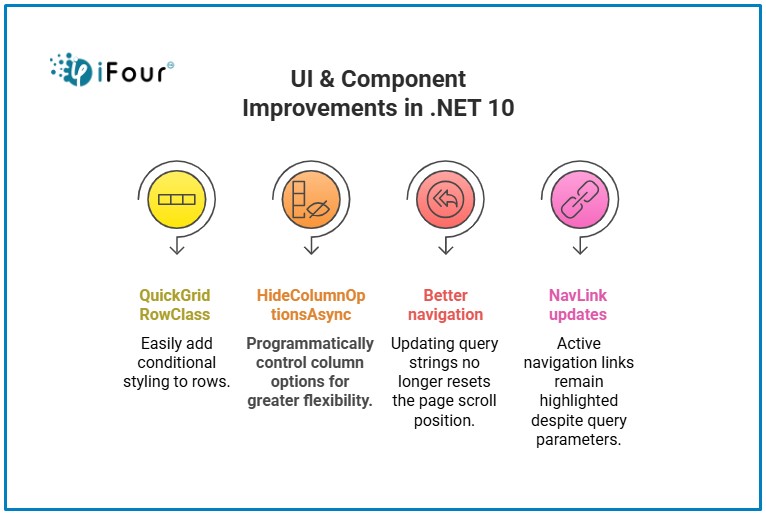
QuickGrid RowClass- Add conditional styling easily.
HideColumnOptionsAsync- Control column options programmatically.
Better navigation- Updating query strings won't scroll the page to the top.
NavLink updates- Active links stay highlighted regardless of query parameters.
Simplify identity governance and access control with Microsoft Entra ID
Monika Mistry, Sr. .NET Developer at iFour shares:
Blazor now optimizes asset loading with client-side fingerprinting and preloading static assets. This means faster first loads and smoother updates.
Dhruv Jain, .NET Core Developer at iFour:
Learn more about ASP.NET Core 10 performance updates here.
Blazor Hybrid lets you build apps that work on desktop and web using the same code. So if you want a desktop feel but still need web access, this is perfect.
Rahul Shiyani, .NET developer, Legal Project, iFour explains:
Read More: What is Blazor web assembly?
ASP.NET Core 10, which is part of .NET 10, has made SignalR a lot better. Now it’s way easier to build real-time stuff like live chats, dashboards, and apps where people can work together at the same time.
Krunal Patel, Project Manager, Fintech Project, shares his take:
Now, .NET experts can use the [PersistentState] attribute to easily keep component state, even during network interruptions or tab freezes. No more writing boilerplate code for session handling!
Jinal Gandhi, .NET Expert, iFour puts it about her experience
Another best feature you would observe in ASP.NET Core 10 is how easily you can work with JavaScript right from .NET. You can create JS objects, call their constructors, even handle async methods; all without leaving your .NET code.
And yeah, you can manipulate properties too. It just makes mixing .NET and JavaScript so much smoother.
Build custom workflows and apps with expert Microsoft 365 Development
Minimal APIs in .NET 10 now come with first-class validation support. Add AddValidation() and the framework takes care of validating request models using DataAnnotations or custom rules.
Minimal APIs are also great for microservices or quick endpoints. This latest version provides more lightweight capabilities than the earlier versions.
Jinal Mehta, .NET Team Lead, says:
Sarbeshwar Partihary, .NET Developer, Healthcare Project:
Read More: ASP.NET Core improvements in .NET 5
"ASP.NET Core 10 now supports SSE, or Server-Sent Events, and that’s a critical aspect for real-time updates. It’s perfect for things like dashboards, live notifications, or streaming data. The best part is, it’s way simpler than setting up WebSockets, so you get real-time without the extra complexity”
Neha Sakaria, Project Manager at iFour emphasizes:
Scale your tech team with top-tier talent Hire .NET developers today
Another best update to talk about is Form validation enhancements in .NET 10. Now you can manage forms smartly just by registering AddValidation() and using [ValidatableType] and get it running.
Empty strings in form posts now get treated as null for nullable types. This small tweak reduces a lot of unnecessary parsing errors.
Devangini Dubey, Sr. .NET Developer, iFour remarks:
Read More: ASP.NET CORE API with Entity Framework
ASP.NET Core 10 brings full OpenAPI 3.1 support, including:
Dhruv Kalaria, API Specialist, iFour Technolab states his opinion on this
Blazor Hybrid with .NET MAUI -> Better integration for mobile + web.
Validation APIs moved -> Now available in a separate package for wider use.
Performance diagnostics -> New profiling tools for Blazor WebAssembly apps.
PWA updates -> Smoother service worker updates without caching issues.
Turn ideas into agile business apps with a trusted Power Apps development company
At some point, you might be asking yourself what changed in ASP.NET Core 10 compared to Previous Versions? Here is the breakdown of -
ASP.NET Core 10 vs Previous Versions
| Feature | ASP.NET Core 8/9 | ASP.NET Core 10 |
|---|---|---|
| Blazor | Earlier versions require manual efforts for load times and UI tweaks | Faster loading, static asset handling, QuickGrid RowClass, better navigation |
| Blazor Hybrid | Older versions supported hybrid, but integration was less smooth. | Improved integration for desktop + web apps |
| SignalR | Previous versions had SignalR, but this update reduces latency and improves scalability. | Better performance & reliability |
| Minimal APIs | Earlier versions introduced Minimal APIs, but now they’re more powerful and flexible. | More capabilities for lightweight APIs |
| OpenAPI | Older versions supported OpenAPI but not 3.1 or YAML out-of-the-box. | Full OpenAPI 3.1 + YAML support |
| Auth Metrics | Previously, you had to implement custom logging for this. | Built-in metrics for sign-ins, sign-outs, auth events |
| Developer Experience | Had basic route handling | Route template syntax highlighting |
You also check ASP.NET vs ASP.NET Core differences to add more clarity.
So, that's all about ASP.NET Core 10 new features. Upgrading to DOT NET 10 could bring significant benefits to your enterprise .NET development services.
If you are looking for a reliable Microsoft Partner with tremendous subject expertise, contact us today.
In this blog, we learned: what are the latest updates of .NET 10 and looked at the differences between ASP.NET Core 10 and previous versions. As the platform evolved, Microsoft made lots of improvements and introduced new features that make it more secure and user-friendly.
ASP.NET Core 10 is all about simplifying development, boosting performance, and modernizing security. From Blazor enhancements to Minimal APIs and OpenAPI support, these updates give you tools to build faster, more reliable, and secure web apps.
This blog also shares real stories from iFour’s .NET experts. These aren’t just random tips—they’ve actually used these features in real projects and seen real results.
If you’ve been working with older versions, now is the perfect time to explore what ASP.NET Core 10 brings to the table.
1. What's new in EF Core 10?
Arpit Shaphakar (Senior .NET Developer):
2. What are the performance improvements in .NET 10?
Krunal Patel (Project Manager):
3. What is the future of ASP.NET Core?
Kishan Vaishnani (Project Manager):
They’re not the same thing. .NET Core was basically the next step after the old .NET Framework - it’s open-source, cross-platform, and runs on Windows, macOS, and Linux. Then Microsoft merged .NET Core with Mono and called it the unified .NET platform starting from .NET 5. So now, we just have one .NET for everything - desktop, web, cloud, you name it.
A lot! Blazor got faster, SignalR is smoother, Minimal APIs are more powerful, and now you get OpenAPI 3.1 support out of the box. Plus, better security metrics and some nice little dev experience tweaks like route highlighting.
Oh yes! Blazor loads quicker now, handles static assets better, and even has cool stuff like QuickGrid updates. If you’re into Blazor, this update is a treat.
It’s all about speed. Faster Blazor loading, optimized APIs, and SignalR runs like a champ for real-time apps. Everything just feels snappier.
Blazor Hybrid lets you build apps that work on desktop and web using the same code. So if you want a desktop feel but still need web access, this is perfect.
Yep! Full support for OpenAPI 3.1 and even YAML format. Makes API docs cleaner and more standard.
They’re a super simple way to build APIs without all the heavy setup. Great for microservices or quick endpoints.
It now tracks sign-ins, sign-outs, and other auth events with built-in metrics. Makes spotting issues way easier.
Absolutely. With vector search support and better integration with modern tools, it’s ready for AI-powered features.
Better speed, cleaner APIs, improved security, and more modern features. Basically, less hassle and more power.
Think of it as a big quality-of-life upgrade. Faster, more flexible, and packed with features like Blazor Hybrid and OpenAPI 3.1 that older versions don’t have.

A passionate Technical writer and an SEO freak working as a Content Development Manager at iFour Technolab, USA. With extensive experience in IT, Services, and Product sectors, I relish writing about Azure Cloud, Data Analytics, AI, & Workflow Automation and love sharing exceptional insights on various platforms. I believe in constant learning and am passionate about being better every day.


Build Your Agile Team
Recent Posts

AI in Legal Practice: Powerful Use Cases Every Lawyer Should Know
September 10, 2026

How to Use Power BI for Sales Forecasting (Guide for CTOs)
August 06, 2026

AI in Power BI - Top Use cases and Best Practices
August 03, 2026


How to Build AI Agents: Strategic Guide for CTOs
March 31, 2026
Categories

Several experts, particularly those just starting out, often find themselves confused about WPF and UWP, wondering if they are the same. Since they are used to create great UIs for...

Many companies rely on advanced technologies to make informed decisions in their business. For instance, some Chief Technology Officers (CTOs) turn to Power BI consulting services,...
Importance of C# - custom software development C# has been dominating the world of programming for the last two decades. Did you know it is the favored language of about 31% of...

Get this Demo!
Get this Demo!
Get this Demo!
Get this Demo!
Get this Demo!
Get this Demo!