


























































Ethical AI in Healthcare: Key Considerations For Patient Safety
Let’s keep it simple. In healthcare, trust, safety, and human dignity come first, no matter what solution you build. The same applies to AI. Today, it is everywhere, from clinics...


601 & 612, The Times square Arcade, Near Baghban party plot, Thaltej - Shilaj Road, Thaltej, Ahmedabad, Gujarat - 380059
Listening is fun too.
Straighten your back and cherish with coffee - PLAY !
Summarize this article with:


AI agents are everywhere these days.
The world's biggest tech players - Microsoft, Alphabet, Amazon, and Meta are investing heavily in AI infrastructure, with spending expected to reach $1.5 trillion by 2030.
And what's all that money doing? It's laying the digital foundation, training advanced models, and pushing AI agents out for business applications.
While leaders like OpenAI, Google, & Anthropic are racing to build autonomous systems that can think, decide, and act on their own, many businesses, on the flip side, still think of AI agents as a mystery - rather than something they can actually learn and use.
Building AI agents is easy. Those who adopt them early can stand out from the rest.
In this guide, we will look at how to build AI Agents strategically and even with zero technical knowledge.
Let's dive in.
How do AI agents help you?
By operating independently, AI agents can help you:
Before you start building an AI Agent, make sure your purpose and requirements are clear. Because, as a CTO, your responsibility is not just to “use AI,” but to architect scalable, secure, production-ready intelligent systems that deliver measurable business outcomes. In short, considering principles of building AI agents is essential.
Here's the checklist you can follow for building AI Agents:
Unlock smarter strategies with Copilot Consulting services — guiding innovation at every step.
CTOs searching “ How to build an AI agent?” typically want the following aspects:
1. A structured, production-ready roadmap
2. Architectural clarity
3. Technology stack decisions
4. Governance & security considerations
5. Scalability guidance
6. Cost vs ROI clarity
So, here's the step-by-step structure to build an AI Agent for CTOs
Before selecting a large language model (LLM) or AI framework, clarify:
Example Enterprise Use Cases of Agentic AI
Your AI architecture should be problem-first, not model-first.
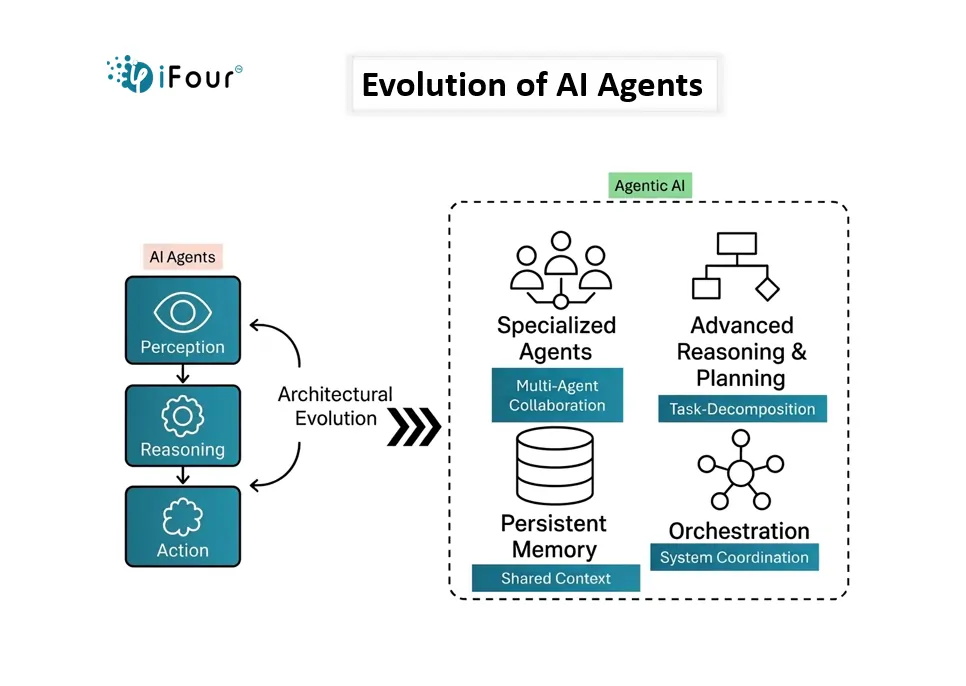
AI agents typically follow one of these architectures:
1. Reactive Agents
Respond directly to input without long-term memory.
Best for simple task automation.
2. Memory-Enabled Agents
Maintain short-term or long-term context.
Ideal for conversational AI systems.
3. Tool-Using Agents
Invoke APIs, databases, or applications.
Common in enterprise automation.
4. Multi-Agent Systems
Multiple AI agents collaborate to complete complex tasks.
Used in advanced workflow orchestration.
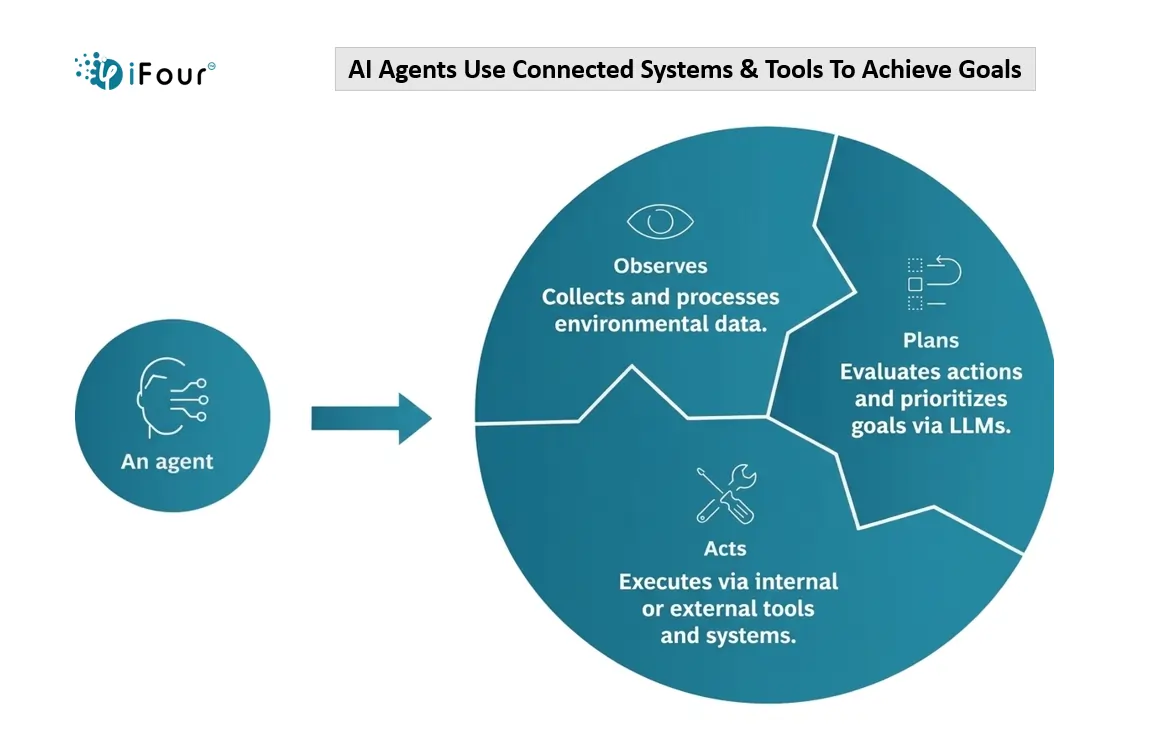
A production-ready AI agent includes the following layers:
1. Input Layer
User interface (chat, API, dashboard)
Event streams
Structured/unstructured data
2. Intelligence Layer
Machine learning models
Retrieval-Augmented Generation (RAG)
Prompt engineering logic
3. Memory Layer
Vector database
Session memory
Long-term knowledge base
4. Tool & Action Layer
REST APIs
Databases
CRM / ERP integrations
Workflow engines
5. Governance & Monitoring Layer
Observability tools
Logging
Hallucination detection
Guardrails & safety filters
Enterprise AI agents fail when governance is ignored.
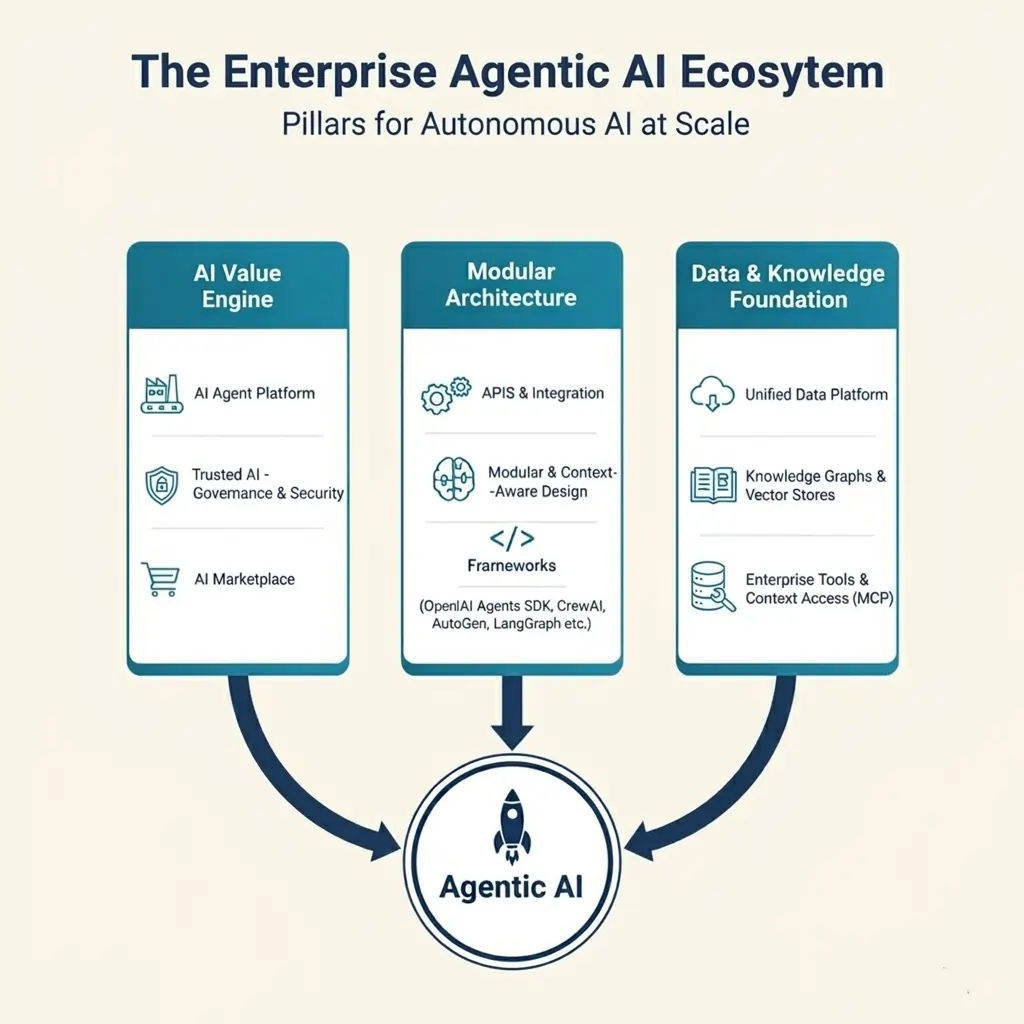
I have published blog on PlusRadiology Site
AI Models
Frameworks for AI Agents
Infrastructure
Data Layer
Transform data into intelligence with Azure AI Consulting services — built for scale and impact.
For CTOs, stack selection must balance:
If your AI agent needs domain-specific knowledge, RAG is essential.
RAG architecture includes:
1. Document ingestion pipeline
2. Embedding generation
3. Vector search
4. Context injection into LLM prompt
RAG improves:
Without RAG, enterprise AI agents often provide generic answers.
AI governance is not optional. As a CTO, you must implement:
Consider regulatory compliance, such as:
Trust and explainability drive adoption.
AI agents require structured evaluation.
Testing Framework
Secure, streamline, and accelerate delivery with DevSecOps Consulting services — innovation without compromise.
Evaluation Metrics
Continuous optimization is mandatory.
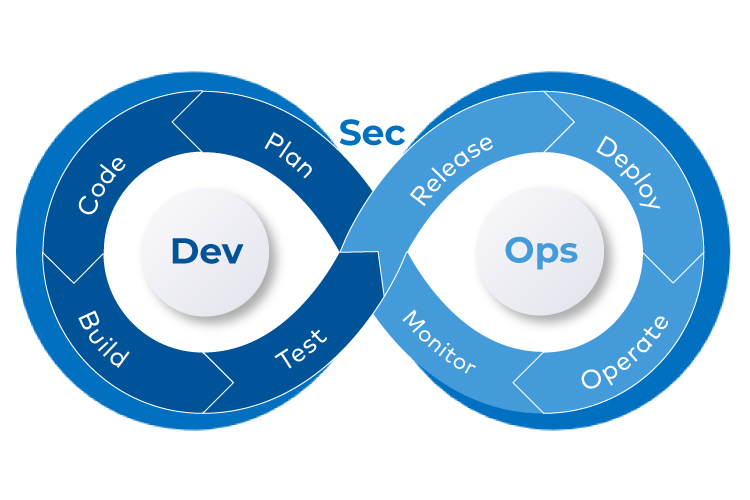
AI agent deployment should follow DevOps best practices:
Plan for:
Production AI systems must be resilient.
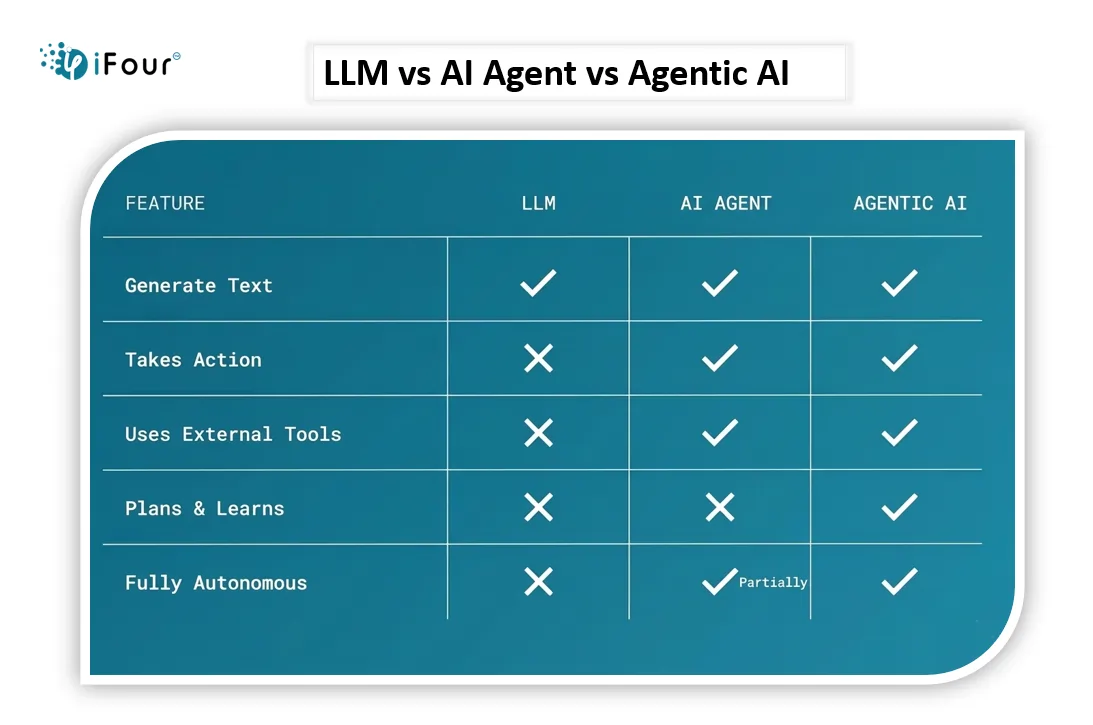
Meanwhile, check out the key differences between LLM, AI Agent, and Agentic AI in the following image.
To build a voice AI agent, you have to configure a conversational AI platform. It could be anything like ElevenLabs, LiveKit, Retell AI. Next comes defining a persona or system prompt, then picking a voice, and connecting it to tools such as calendars or CRM systems (using n8n or Zapier).
Let's explore these steps in detail.
1. Pick what your voice agent should actually do
Decide the vibe first:
- Should it answer FAQs?
- Book appointments?
- Give product support?
- Talk like a human assistant?
Basically: define its job so you don't end up building a chatbot that just… talks.
2. Choose your speech tools for building AI agents (voice in + voice out)
You need two things:
Speech-to-Text (STT) -> turns voice into text
Text-to-Speech (TTS) -> makes your AI talk back
Modernize your data for agility and growth with Data Modernization services — future ready today.
Popular picks:
Pick what sounds good (literally).
3. Pick the brain of the agent (the LLM)
This is where the “intelligence” lives.
You can use:
The model reads the text, thinks, and decides what to say back.
4. Give it rules, personality & guardrails
Your agent needs a persona, otherwise it's just vibes.
Add instructions like:
This becomes its “voice DNA.”
5. Connect everything together
Your pipeline looks like:
User speaks -> STT -> LLM -> TTS -> Agent speaks back
Think of it as:
capture -> interpret -> express -> repeat.
You can build it with:
6. Add real actions (this is where it becomes a true agent)
Let your voice agent do things, not just talk:
This is where it goes from “Alexa clone” to "actual assistant."
Build low-code apps quickly with Power Apps Consulting services — custom solutions made simple.
7. Train it with sample dialogues
Give it examples of:
The more examples, the more natural and confident it becomes.
8. Test it with real humans
Record conversations.
Find awkward moments.
Fix the "umm… sorry, I didn't get that" loops.
Fine tune until it feels smooth and human like.
9. Deploy where you need it
You can publish it on:
Doing this lets your agent go live and start talking to people.
10. Track performance & keep improving it
Check metrics like:
Use this to refine responses and logic.
The next wave includes:
With all these, one thing is clear: CTOs who build AI-native infrastructure today gain a long-term competitive advantage. So, that's all from this blog. Hope this helps you.
In case of any queries or requirements on creating Digital agents, reach out to us from our website.
AI Agents are rewriting business rules. With Agentic AI investments up 340% in 18 months, adoption is no longer optional — it's strategic.
Innovators are already moving AI from concept to autonomy, and those who act now will lead. As simple as that.
Building an AI agent isn't experimental anymore. It's a core enterprise capability that could simplify most of your processes while letting you focus on other crucial tasks.
This guide outlined how to build AI agents from technical, architectural, and governance perspectives, aligned with real world deployment standards.
Ready to move from pilot to production? Partner with iFour - the best company for building AI agents, from concept to autonomy.
An AI agent is an autonomous software system that:
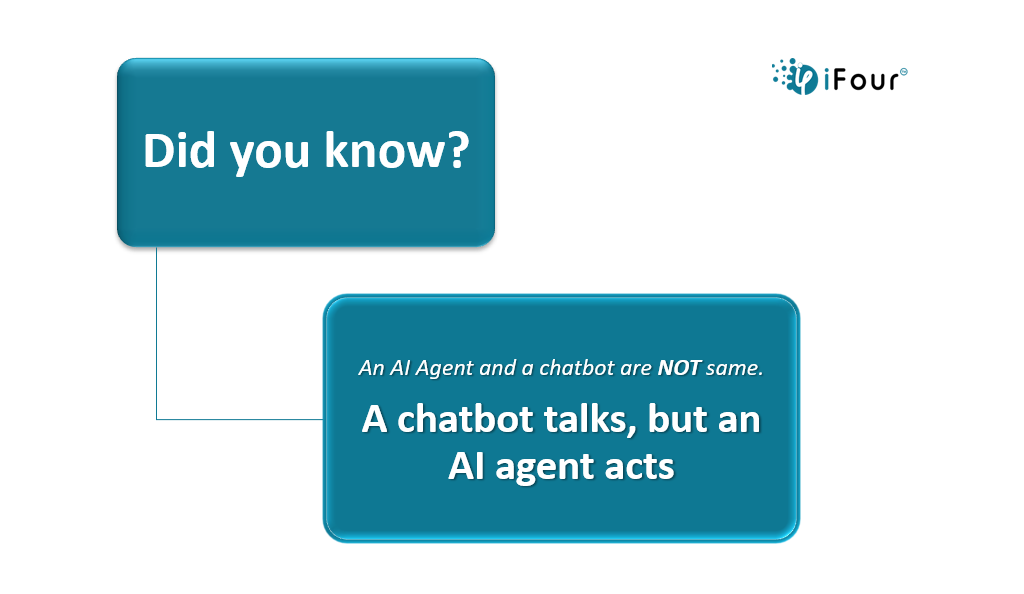
AI Agent is different from a chatbot. A chatbot talks, but an AI agent acts.
AI Agent vs Chatbot: Key Differences
| Feature | AI Agent | Traditional Chatbot |
|---|---|---|
| Memory | Yes | Limited |
| Tool usage | Yes | Rare |
| Autonomy | High | Low |
| Decision-making | Multi-step reasoning | Rule-based |
| Enterprise use | Advanced automation | Basic FAQs |
Understanding this distinction prevents architectural misalignment.
Costs depend on:
A basic internal AI assistant may cost significantly less than a multi-agent enterprise automation system.
Plan budget across:
And if you're wondering which ones matter most, here's the shortlist — with their architecture, their strengths, and where they shine in enterprise.
| Framework | Developer | Core Philosophy | Best For |
|---|---|---|---|
| AutoGen | Microsoft | Conversation-centric | Research & Dynamic Tasks |
| CrewAI | Open Source | Role-based / Process-driven | Business Workflows |
| LangGraph | LangChain | State-machine / Graph-based | Cyclic/Deterministic Loops |
| ADK | Modular / Cloud-native | Gemini-optimized apps | |
| Semantic Kernel | Microsoft | Enterprise SDK | Legacy System Integration |
| Smolagents | Hugging Face | Code-centric / Minimalist | Rapid Prototyping |
| AutoGPT | Community | Autonomous / Goal-driven | Independent Research |
Common mistakes CTOs make when building AI Agents are:
1. Starting with the model instead of the use case
2. Ignoring data quality
3. Underestimating prompt engineering
4. Skipping governance
5. Deploying without monitoring
6. Not defining ROI upfront
A key aspect to remember is that AI agents are systems, not chat interfaces.
Here's how to build your own AI agent:
1. Define the Purpose
You start by deciding what problem your agent will solve.
Be specific: is it answering questions, automating tasks, or analyzing data?
2. Choose the Framework or Platform
You pick a base technology (LangChain, AutoGPT, or custom Python scripts).
This gives you the building blocks for memory, reasoning, and tool use.
3. Set Up the Environment
Install dependencies (Python, libraries, APIs).
Configure access to external tools like search engines, databases, or APIs.
4. Design the Agent's Architecture
You define inputs (user queries, data feeds).
You set outputs (answers, actions, reports).
You decide how the agent will process information (LLM + tools + memory).
5. Add Core Capabilities
Reasoning: connect the agent to a large language model.
Memory: store context so it doesn't forget past interactions.
Tools: integrate APIs or functions (search, calculations, scheduling).
6. Implement Interaction Flow
You script how the agent responds step by step.
Example: user asks -> agent interprets -> agent calls tool -> agent replies.
7. Test Iteratively
Run small scenarios to check if the agent behaves as expected.
Debug errors, refine prompts, and adjust tool integration.
8. Deploy for Use
Package the agent into a web app, chatbot, or workflow automation.
Ensure it's accessible to your intended audience.
9. Monitor and Improve
Track performance (accuracy, speed, user satisfaction).
Continuously refine prompts, add tools, and expand capabilities.
Define objectives: Clarify what role it is for? (Lead generation, qualification, closing).
Train with data: Use product knowledge, past sales conversations, and related CRM records.
Integrate AI models: Apply NLP and machine learning for intent detection and personalization.
Connect systems: Link with CRM, marketing automation, and communication channels.
Add safeguards: Ensure compliance, ethical use, and human handoff for complex cases.
Optimize continuously: Monitor performance, retrain models, and refine workflows.

A passionate Technical writer and an SEO freak working as a Content Development Manager at iFour Technolab, USA. With extensive experience in IT, Services, and Product sectors, I relish writing about Azure Cloud, Data Analytics, AI, & Workflow Automation and love sharing exceptional insights on various platforms. I believe in constant learning and am passionate about being better every day.


Build Your Agile Team
Recent Posts

AI in Legal Practice: Powerful Use Cases Every Lawyer Should Know
September 10, 2026

How to Use Power BI for Sales Forecasting (Guide for CTOs)
August 06, 2026
AI in Power BI - Top Use cases and Best Practices
August 03, 2026
How to Build AI Agents: Strategic Guide for CTOs
March 31, 2026
Categories

Let’s keep it simple. In healthcare, trust, safety, and human dignity come first, no matter what solution you build. The same applies to AI. Today, it is everywhere, from clinics...

Let's keep it real. The whole point of building autonomous Agents is to cut manual work and keep focus on business. Approvals that used to take days can happen in hours because...
AI and Automation aren’t just options anymore. They are a necessity to keep yourself focused on what matters the most. Whether it is Zapier or Power Automate, ChatGPT or Copilot, every...

Get this Demo!
Get this Demo!
Get this Demo!
Get this Demo!
Get this Demo!
Get this Demo!