































































What’s New in ASP.NET Core 10 – Key Features & Expert Insights
We tracked the evolution of .NET 9 on Reddit, and watched the heated debates on .NET 6 vs .NET 8. And just when we thought that things had finally settled, Microsoft drops another...


601 & 612, The Times square Arcade, Near Baghban party plot, Thaltej - Shilaj Road, Thaltej, Ahmedabad, Gujarat - 380059
Listening is fun too.
Straighten your back and cherish with coffee - PLAY !
Summarize this article with:



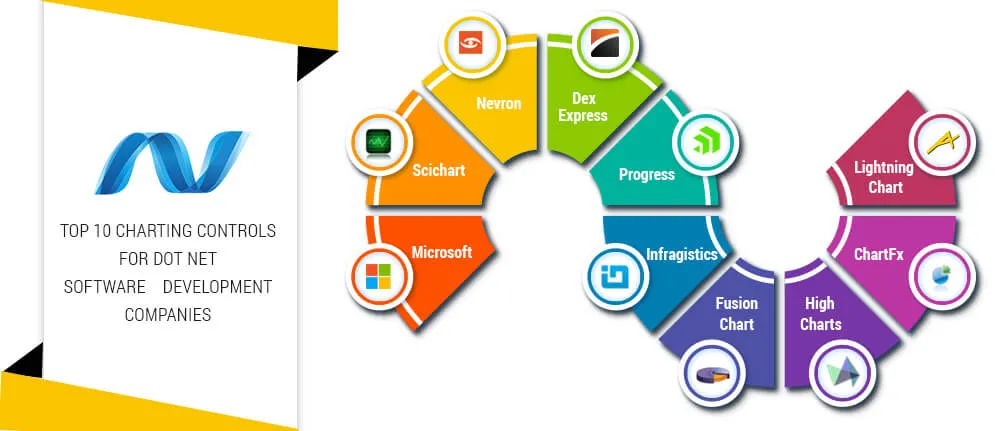
In the era of information, data visualization plays an important role in enhancing and making information systems useful to decision makers. This allow important data to be visualized properly so that important concepts, information and analytics are made handy to end users. Charting controls are important for DOT NET software development companies while developing software with data visualization. PIE Chart, LINE Chart, BAR Chart, BUBBLE Chart, PYRAMID chart etc are some of the charts that helps display information meaningfully with analysis. The charting controls allow user with additional features like sorting, filtering, grouping, searching, merging, splitting and exporting data in required format.
In this article, we discuss about Top 10 chart controls that are very popular, feature rich and widely used by custom software companies in USA to build information rich softwares.

LightningChart Ultimate is the fastest, popular and widely used 2D and 3D measurement, financing, research and trading data visualization SDK for software development based on WinForms and WPF. LightningChart Ultimate is entirely GPU accelerated (Direct3D) and performance optimized data visualization control for presenting masses of data in 2D XY graph, 3D XYZ, polar, smith and 3D pie / donut views.
| Pros | Cons |
|---|---|
| Fastest rendering data visualization toolkit for .net framework | Supports only Window and WPF Application |
| Short loading delays | |
| Better graphics quality |

RadChart is an unrivalled and performance enhanced charting tool that helps developing next-generation software. It is highly feature rich with great data visualization capability and helps in better analysis of complex data. RadChat allows transformation of business data into animated charts and interactive UI. It is compatible with WPF.
| Pros | Cons |
|---|---|
| Supports multiple data sources | Does not support scatter line chart |
| It does not require additional assemblies | Server side click events |
| Better technical support | |
| Good performance from speed perspective |

DevExpress charting tools are highly popular for data visualization that is concise and readable. XtraCharts suite is highly customization control library which is used for endless business scenarios. It is equally suitable for real-time charting or analysis of multi-dimensional data. DevExpress WPF chart control supports built-in animation effects, conditional appearance options and extended interactivity.
| Pros | Cons |
|---|---|
| Highly customization and flexible | Comparatively slow |
| Good performance | Do not manage rendering of web chart to the image |
| Numerous In-built supportive controls | Used in WinForms control |
| Supports MVVM architecture | |
| Supports multiple data source |

This is a charting tool that supports .NET, HTML5, COM, WPF, Silverlight and SQL reporting services technologies. Chart FX is considered as one of the most powerful and versatile multi-platform tool for web and desktop software data visualization.
This provides software companies with advanced data visualization and analysis features with minimal integration effort. It enhances user interface and has ability to export the charts in various formats.
| Pros | Cons |
|---|---|
| Highly extensible | Scalability and performance issue |
| Support multiple technology platforms |

Infragistics chart is known to provide rich charts with less code. Infragistics Charts is Windows Forms Chart Control that renders a broad range of rich, high-fidelity chart types from familiar bar, line, area and pie to more complex financial, candle and radar charts. It helps building complex charts with series collections, chart area collections and chart layers collections.
| Pros | Cons |
|---|---|
| Easy-to-use | Support only few chart like Data Chart, Doughnut Chart, Gantt Chart, Pie Chart |
| Highest quality visual appearance | |
| Handle real time feeds |

Microsoft .Net Chart controls enable custom software development companies to create Windows Forms applications with simple, intuitive, and visually compelling charts for complex statistical or financial analysis. Window form chart control support Zooming and scrolling.
| Pros | Cons |
|---|---|
| Well documented | Does not support Cursors, Zooming, and Scrolling, Printing feature in web application |
| Ready code templates | |
| Ability to view controls in action | |
| Supports all chart types | |
| Support for AJAX click events |
.webp)
Nevron Chart is the most leading charting control for DOT NET software companies. It can easily be integrated with WinForms, ASP.NET, WPF and ASP.NET MVC projects. Nevron chart covers 2D and 3D charting types and is suitable for profession, business, scientific, real time monitoring and other types of applications.
It only provides great data visualization but is complemented with interactive features like data zooming, panning, scrolling and hit testing.
| Pros | Cons |
|---|---|
| Fast performance | It does not support all charting types |
| Highly robust tool with great controls | |
| Better image quality | |
| It is offering a free charting solution for WinForms, WPF, and ASP.NET, covering basic charting functionality |
LiveCharts2 is an open-source charting control for .NET applications. It is used to create interactive and animated charts for desktop, web, and cross-platform applications. It supports WPF, WinForms, Blazor, .NET MAUI, and Avalonia, making it a good choice for developers who want a flexible charting solution.
| Pros | Cons |
|---|---|
| Open-source and free to use | Some advanced features require additional coding |
| Supports multiple .NET platforms | Community support is better than commercial support |
| Easy to customize | |
| Provides real-time data updates |
Syncfusion Charts is a powerful charting control that provides a wide range of chart types for .NET applications. It supports ASP.NET Core, Blazor, WPF, WinForms, and .NET MAUI. The control helps developers build dashboards and reports with interactive and customizable charts.
| Pros | Cons |
|---|---|
| Offers more than 50 chart types | Commercial license is required for business use |
| Supports multiple .NET platforms | Beginners may need time to learn advanced features |
| Good performance with large datasets | |
| Easy to customize |
Ignite UI by Infragistics is a charting control used for developing data-driven .NET applications. It provides interactive charts and supports ASP.NET Core, Blazor, WPF, and WinForms. It is suitable for applications that require rich data visualization and reporting features.
| Pros | Cons |
|---|---|
| Supports a wide variety of chart types | Commercial licensing can increase project cost |
| Good performance with large datasets | Some advanced features require additional configuration |
| Easy integration with .NET applications | |
| Rich customization options |
So, these are the top .NET charting control tools one should be aware of. Hope this information helps. Want to create a customized dashboard for seamless data visualization? Get Power BI Consulting Services from iFour right away. With a decade of expertise, we provide you with the help you require.
.Net Chart controls helps enhancing user interface and data visualization in most meaningful way. It is difficult to tag any charting tool as the best. Choice of charting tool by DOT NET software companies depends on project requirements, back-end technology, charting performance, cost and many other parameters. This list is an indicative list that a DOT NET software company can use to select.
Build Your Agile Team
Recent Posts

AI in Legal Practice: Powerful Use Cases Every Lawyer Should Know
September 10, 2026

How to Use Power BI for Sales Forecasting (Guide for CTOs)
August 06, 2026

AI in Power BI - Top Use cases and Best Practices
August 03, 2026


How to Build AI Agents: Strategic Guide for CTOs
March 31, 2026
Categories

We tracked the evolution of .NET 9 on Reddit, and watched the heated debates on .NET 6 vs .NET 8. And just when we thought that things had finally settled, Microsoft drops another...

Today, we’re thrilled to present you with the first glimpse of .NET 9 release and let you know what features and updates you can anticipate in this new version. Various professionals believe that it’s the right time to explore and adopt the latest version of .NET for your upcoming projects. It is even recommended for projects built using .NET 6 or .NET 8, due to the framework updates made in this version.

Several experts, particularly those just starting out, often find themselves confused about WPF and UWP, wondering if they are the same. Since they are used to create great UIs for...

Get this Demo!
Get this Demo!
Get this Demo!
Get this Demo!
Get this Demo!
Get this Demo!